JavaScript Variable & Identifiers
Now that you understand data and values, let's talk about identifiers and variables. By the end of this tutorial you'll know how to create variables, name them properly, and use them in your code.
Variables let you save data and reuse it later. Identifiers are just the names you give them. Getting comfortable with both is one of the first real steps in learning JavaScript.
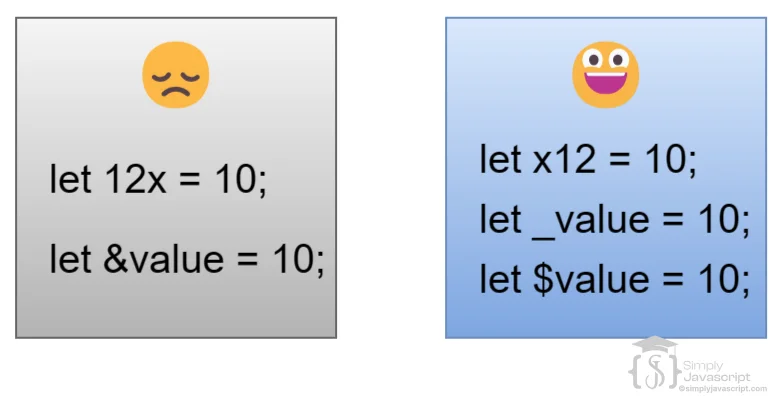
An identifier is simply a name you give to something in your code, like a variable, a function, or an object. Think of it as a label that helps you find and use different pieces of your program. Here are the naming rules you need to follow:
- Must start with a letter, an underscore (_), or a dollar sign ($)
- After that initial character, you can use as many letters, digits (numbers), underscores, or dollar signs as you want
- Variables and functions usually begin with lowercase letters.
- Constants should be in uppercase. For example: RATE
- Avoid using reserved words as identifier names.
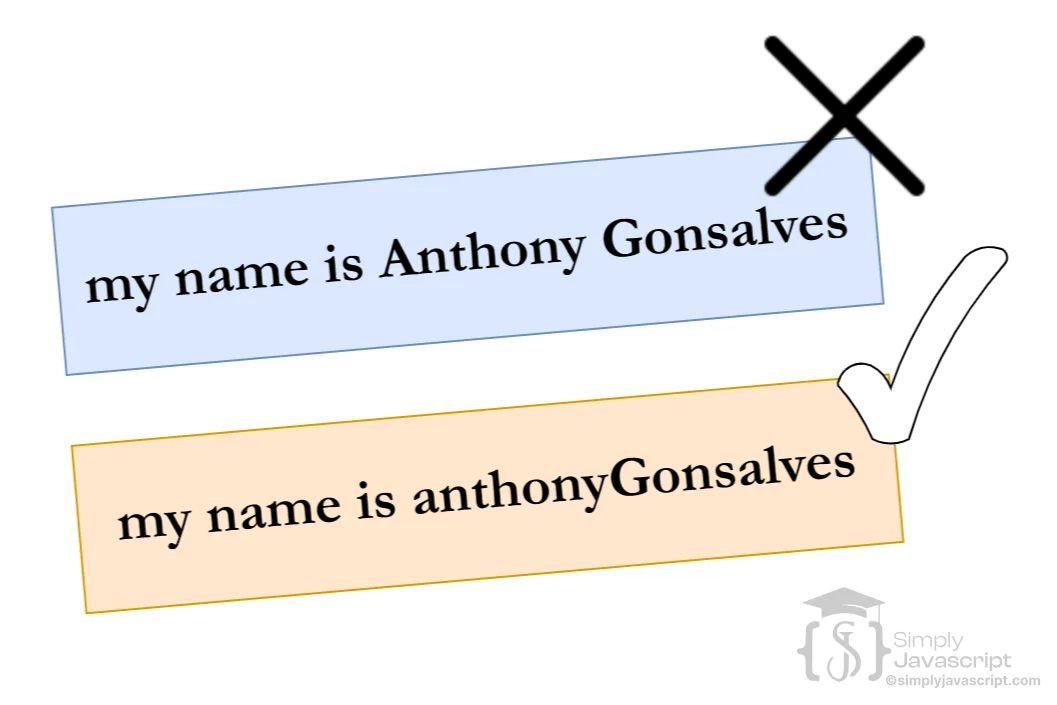
- When naming variables and functions, use camelCase. For example: myAge, rateOfInterest.
- Constants, on the other hand, prefer snake_case. Use underscores (_) to separate words. For example: INTEREST_RATE
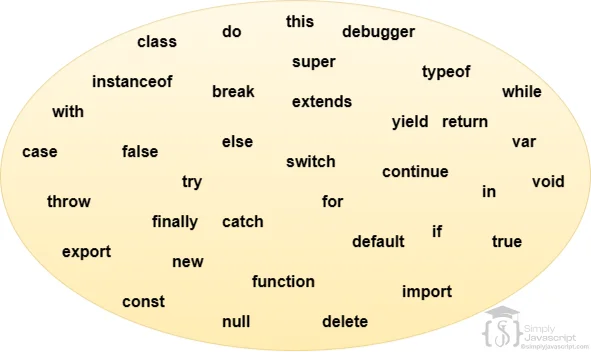
Some words in JavaScript are already taken. Words like function, if, and for have built-in meanings, so you can't use them as names for your own variables or functions.
If you accidentally use a reserved keyword as a name, JavaScript will throw a syntax error. It's basically saying, "That name is already taken, pick another one!" As shown above, the image lists all the reserved keywords you should avoid.
A variable is like a labeled box where you store a piece of data. You give the box a name, put something inside, and then you can come back to it whenever you need that data again.
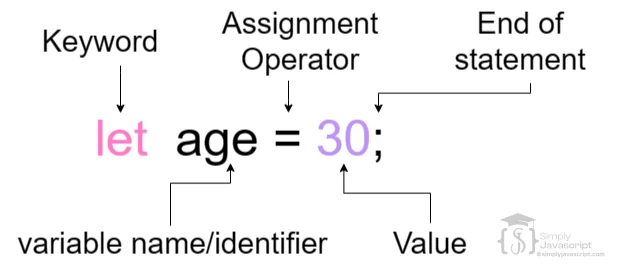
To create a variable, use a keyword like var or let, followed by a name of your choice. For example:
let age = 30; //30 is value and age is variable Once a variable is created, you can read its value or update it at any time. You could change age to a different number, or even store a completely different type of data in it while the program is running.
var is the original way to create variables in JavaScript. It has a wider reach than let and const, meaning it can be accessed throughout an entire function or even globally. You can also redeclare it without errors. For example:
var val = 300;
console.log(val); //prints 300
console.log(age); //allowed and value will be undefined here
var age;
var val  = 400; //redeclaration allowed
let and const were added in ES6 (2015) because var caused some confusing bugs. var still works, but most developers prefer let and const because they behave more predictably, especially when it comes to scoping.
Below are the some important points for var:
- Can be redeclared
- Can be reassigned
- Accessible in global scope (attached to Window object)
- Delcared using camelCase. For example: myAge
- Has function scope
- Does not have block scope
- Hoisting occurs
- Temporal Dead Zone (TDZ) applies
let creates a variable that only exists inside the block (like an if or a loop) where you declared it. Unlike var, you can't accidentally redeclare it, which prevents naming conflicts and makes your code easier to follow. For example:
let x = 10;
let x = 20;
console.log(x);//SyntaxError: 'x' has already been declared
Below are the some important points for let:
- Cannot be redeclared
- Can be reassigned
- Accessible in global scope
- Delcared using camelCase. For example: myAge
- Has function scope
- Has block scope
- Hoisting occurs
- Temporal Dead Zone (TDZ) applies
A constant is a variable whose value never changes after you set it. Once you lock it in, it stays the same for the entire program.
You create a constant with the const keyword, and you must give it a value right away. If you try to declare a const without a value, or try to change it later, JavaScript will throw an error. For example:
const PI = 3.14;
//below code will result in an error
PI = 3.14159;
const RATE; //this will result in an error as value is not assigned.
Below are the some important points for constant:
- Cannot be redeclared
- Constants should be in uppercase
- Cannot be reassigned
- Accessible in global scope
- Constants delcared using snake_case. Use underscores (_) to separate words. For example: INTEREST_RATE
- Has function scope
- Has block scope
- Hoisting occurs
- No Temporal Dead Zone (TDZ)
| Description | var | let | const |
|---|---|---|---|
| Launch Year | Since beginning | 2015 (ES6) | 2015 (ES6) |
| Accessible in Global Scope | Yes (Attached to Window Object) | Yes (Not attached to window object) | Yes (Not attached to window object) |
| Function Scope | Yes | Yes | Yes |
| Block Scope | No | Yes | Yes |
| Redeclaration | Yes | No | No |
| Reassigned | Yes | Yes | No |
| TDZ | No | Yes | Yes |
| Hoisting | Yes | Yes | Yes |
- Identifier: A name you give to a variable, function, or object. Must start with a letter, underscore, or dollar sign.
- Naming rules: Use camelCase for variables and functions (myAge), UPPER_SNAKE_CASE for constants (INTEREST_RATE). Never use reserved keywords as names.
- Reserved keywords: Words like if, for, and function are already taken by JavaScript and can't be used as identifiers.
- Variable: A labeled container for data, created with var, let, or const.
- var: Function-scoped, can be redeclared and reassigned. The old way of creating variables.
- let: Block-scoped, can be reassigned but not redeclared. Preferred for values that change.
- const: Block-scoped, cannot be reassigned or redeclared. Must be given a value immediately. Use for values that should never change.
- What are identifiers in JavaScript? Can you provide examples of valid and invalid identifiers?
- Explain the rules and conventions for creating identifiers in JavaScript. What naming conventions should be followed while naming variables or functions?
- Explain the concept of reserved keywords.
- Define variables in JavaScript. How are they used to store and manipulate data within a program?
- What are constants in JavaScript? How do they differ from variables, and why might you use constants in your code?
- Explain the purpose and usage of the let keyword in JavaScript. How does let differ from var in terms of scope and hoisting?
- Explain the usage and behavior of the var keyword in JavaScript. What are the scope and hoisting implications of using var?
- Describe the role and behavior of the const keyword in JavaScript. What restrictions does it impose on variable reassignment, and how does it relate to immutability?


Variables And Identifier