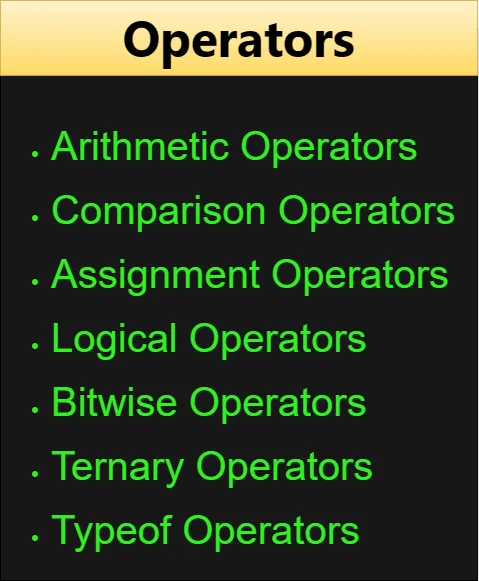
JavaScript Operators
Operators are symbols that tell JavaScript to do something with your data. Think of them as tools in a toolbox: one adds numbers, another compares values, another assigns a result to a variable. You'll use them in almost every line of code you write.
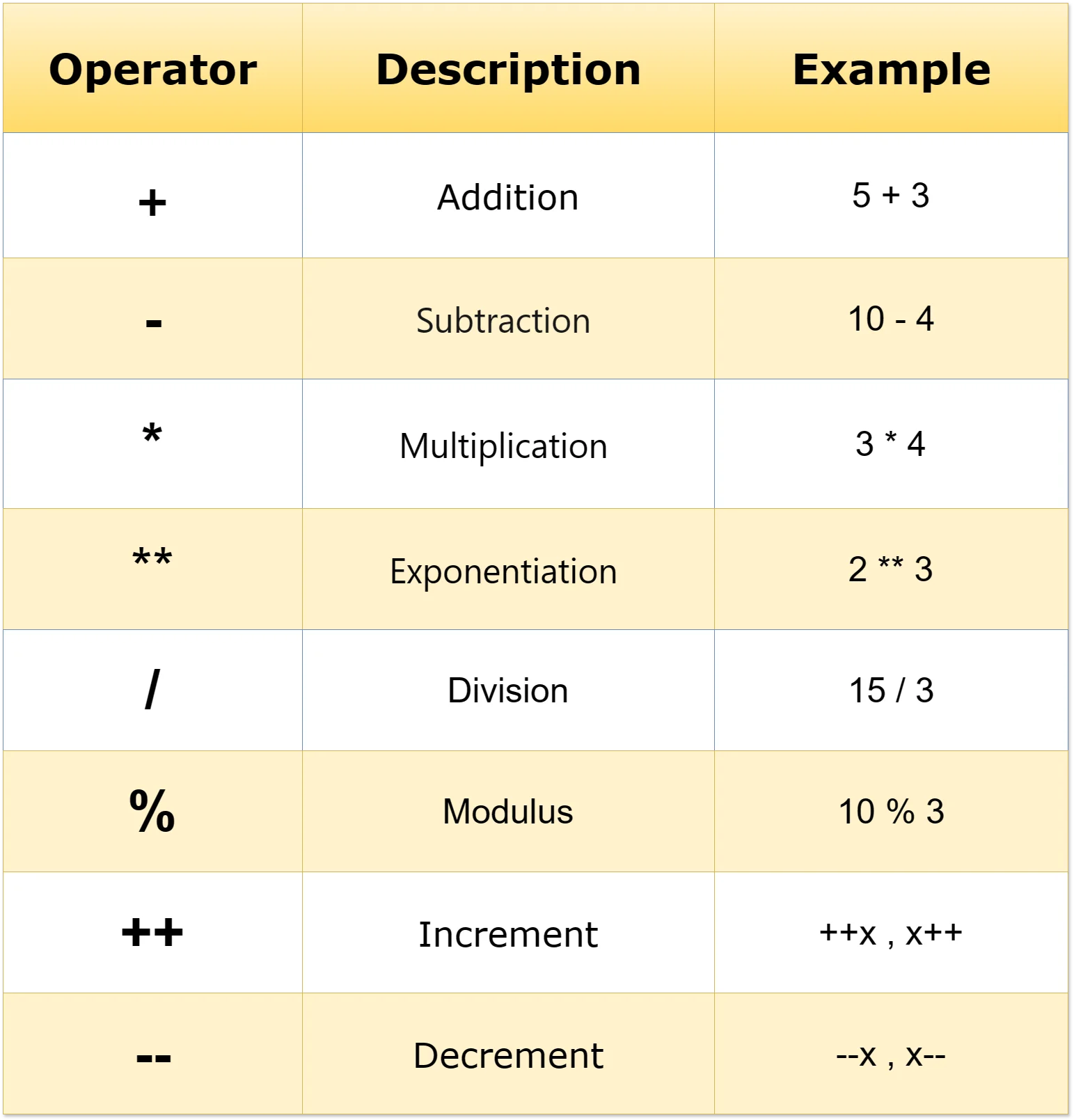
These are your basic math operators. They let you add, subtract, multiply, divide, and more, just like a calculator.
-
Addition (+): It does what it says
on the tin. It adds numbers together. For example, 5 + 3
equals 8. Similarly, if you concatenate two strings,
like "hello" + "world", it becomes "helloworld".
let additionResult = 5 + 3; console.log(additionResult); // Output: 8 console.log("hello"+"world"); //helloworld -
Subtraction (-): It's for taking
away one number from another. Like 10 - 4 equals 6.
let subtractionResult = 10 - 4; console.log(subtractionResult); // Output: 6 -
Multiplication (*): This one is for
multiplying numbers together. For instance, 3 * 4
equals 12.
let multiplicationResult = 3 * 4; console.log(multiplicationResult); // Output: 12 -
Exponentiation ** (ES2016): It
raises one number to the power of another. So, 2 **
3 means 2 raised to the power of 3, which equals 8.
let exponentialResult = 2 ** 3; console.log(exponentialResult); // Output: 8 -
Division (/): It's for dividing one
number by another. For example, 15 / 3 equals 5.
let divisionResult = 15 / 3; console.log(divisionResult); // Output: 5 -
Modulus (%): It gets you the
remainder after a division. For instance, 10 % 3
would give you 1 because 3 goes into 10 three times
with a remainder of 1.
let moduloResult = 10 % 3; console.log(moduloResult); // Output: 1 (This gives the remainder when 10 is divided by 3.) -
Increment (++) & Decrement (--): The ++ operator increments a variable
by 1, while the -- operator decrements
a variable by 1. When used as
postfix (variable++ or variable--), the
current value of the variable is used in the
expression, and then the variable is incremented or
decremented. When used as
prefix (++variable or --variable), the
variable is first incremented or decremented, and
then its new value is used in the expression.
let x = 10;
let y  = 20;
console.log(x++ + ++y); // Output: 10 + 21 = 31
console.log(x + y--); // Output: 11 + 21 = 32
console.log(++x + y); // Output: 12 + 20 = 32
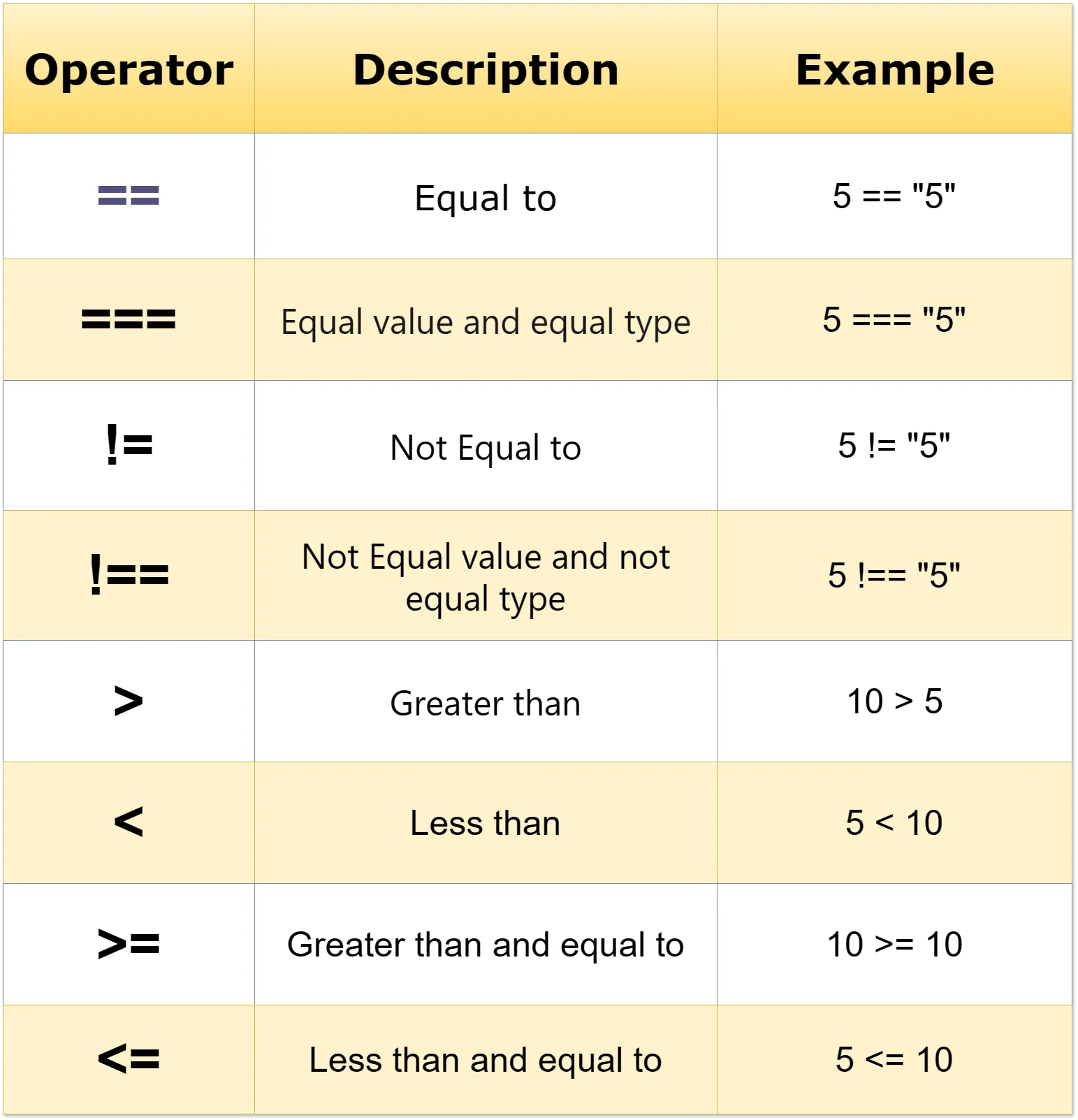
Comparison operators let you compare two values and get back true or false. They're the foundation of every decision your code makes.
-
Equal to (==): It checks if two
values are equal. However, it performs type
coercion, which means it might convert the types and
then compare. For instance, 5 == "5" would be true.
console.log(5 == "5"); // Output: true (Type coercion is performed) -
Equal value and equal type (===): This compares both the value and the type. It's
more strict than ==. For example, 5 === "5" would be
false.
console.log(5 === "5"); // Output: false (Considers both value and type) -
Not equal to (!=): Checks if two
values are not equal. Similar to ==, it performs
type coercion. For instance, 5 != "5" would be
false.
console.log(5 != "5"); // Output: false (Type coercion is performed) -
Not equal value or not equal type (!==):Compares both value and type, and returns true if
they're not equal. For example, 5 !== "5" would be
true.
console.log(5 !== "5"); // Output: true (Considers both value and type) -
Greater than (>): Checks if the
left value is greater than the right one. For
instance, 10 > 5 would be true.
console.log(10 > 5); // Output: true -
Less than (<): Checks if the left
value is less than the right one. For example, 5 <
10 would be true
console.log(5 < 10); // Output: true -
Greater than or equal to (>=): Compares if the left value is greater than or equal
to the right one. For instance, 10 >= 10 would be
true.
console.log(10 >= 10); // Output: true -
Less than or equal to (<=): Compares if the left value is less than or equal
to the right one. For example, 5 <= 10 would be
true.
console.log(5 <= 10); // Output: true
Assignment operators store a value in a variable. The simplest one is =, but there are shorthand versions like += and -= that do a math operation and assign the result in one step.
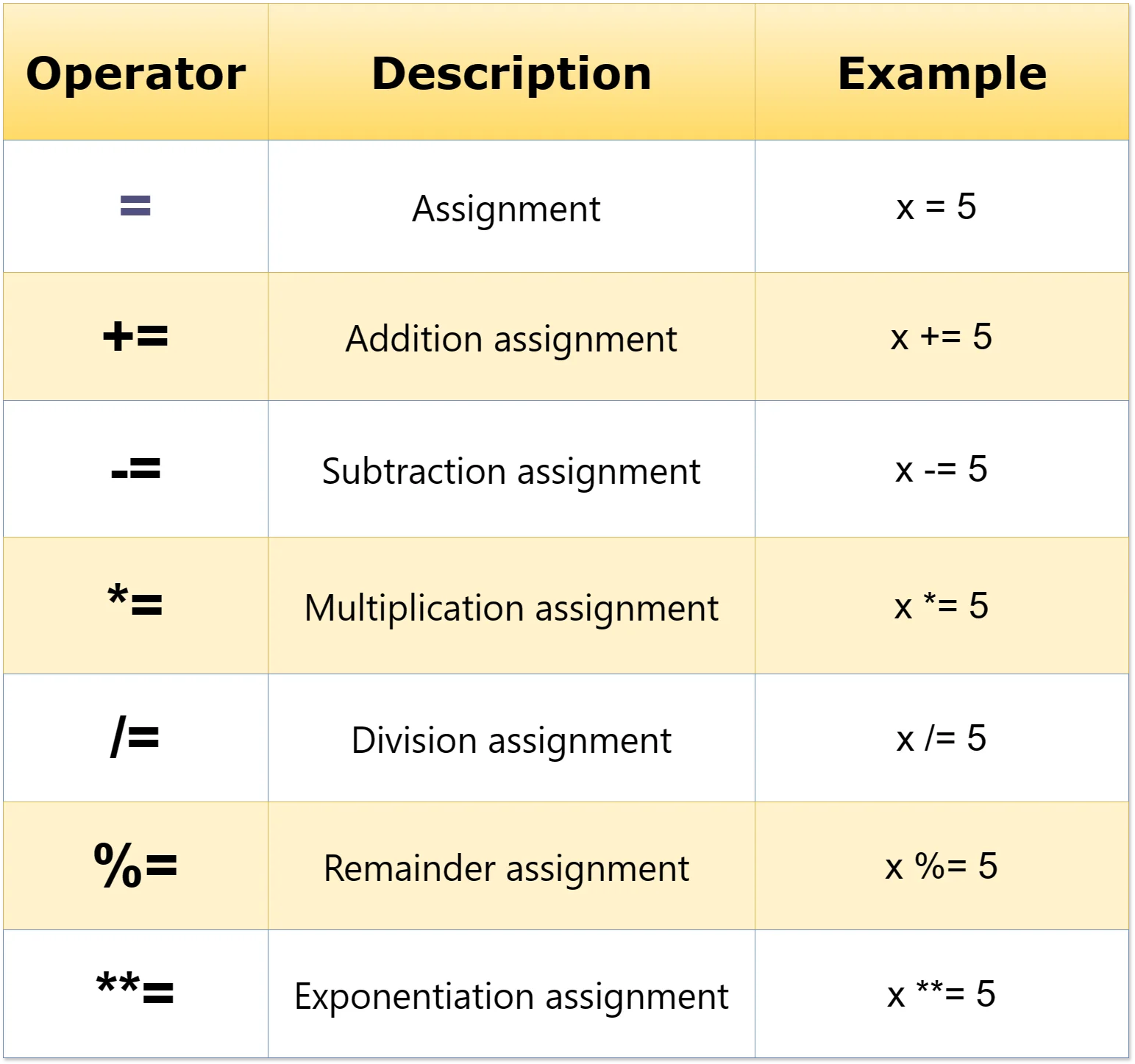
-
Assignment (=): It checks if both
conditions on its left and right are true. For
example, true && true would be true, but true &&
false would be false. If either operand is false,
the whole expression is false.
let condition = (true && true); console.log(condition); // Output: true -
Addition assignment (+=): It adds
the right operand to the left operand and assigns
the result to the left operand. For example, x += 3;
is the same as x = x + 3;.
let x = 5; x += 3; console.log(x); // Output: 8 (Equivalent to x = x + 3) -
Subtraction assignment (-=): It
subtracts the right operand from the left operand
and assigns the result to the left operand. For
instance, x -= 2; is the same as x = x - 2;.
let y = 10; y -= 2; console.log(y); // Output: 8 (Equivalent to y = y - 2) -
Multiplication assignment (*=): It
multiplies the left operand by the right operand and
assigns the result to the left operand. For example,
x *= 4; is the same as x = x * 4;.
let a = 3; a *= 4; console.log(a); // Output: 12 (Equivalent to a = a * 4) -
Division assignment (/=): It
divides the left operand by the right operand and
assigns the result to the left operand. For
instance, x /= 2; is the same as x = x / 2;.
let b = 8; b /= 2; console.log(b); // Output: 4 (Equivalent to b = b / 2) -
Remainder assignment (%=): It
divides the left operand by the right operand and
assigns the remainder to the left operand. For
example, x %= 3; is the same as x = x % 3;.
let c = 10; c %= 3; console.log(c); // Output: 1 (Equivalent to c = c % 3) -
Exponentiation assignment (=)** (ES2016):
It raises the left operand to the power of the right
operand and assigns the result to the left operand.
For instance, x **= 2; is the same as x = x ** 2;.
let d = 2;
d **= 3;
console.log(d); // Output: 8 (Equivalent to d = d ** 3)
Logical operators combine or flip true/false values. There are three of them: AND, OR, and NOT.
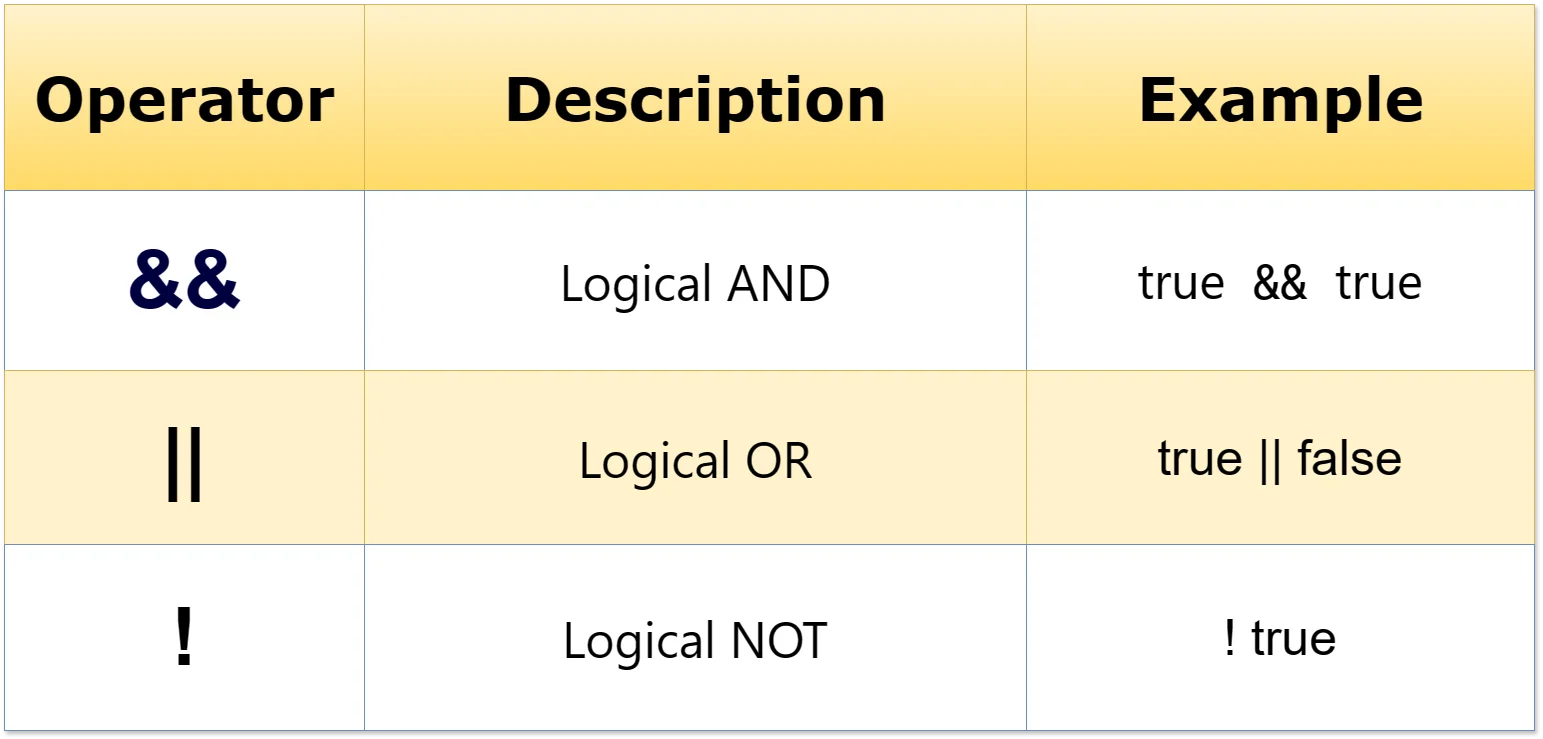
-
Logical AND (&&): It checks if
both conditions on its left and right are true. For
example, true && true would be true, but true &&
false would be false. If either operand is false,
the whole expression is false.
let condition1 = true && true; console.log(condition1); // Output: true let condition2 = true && false; console.log(condition2); // Output: false -
Logical OR (||):It checks if at
least one of the conditions on its left or right is
true. For instance, true || false would be true, and
false || false would be false. If either operand is
true, the whole expression is true.
let condition3 = true || false; console.log(condition3); // Output: true let condition4 = false || false; console.log(condition4); // Output: false -
Logical NOT (!): It's a unary
operator that negates the value of a condition. For
instance, !true would be false, and !false would be
true. It flips the value of the operand.
let condition5 = !true;
console.log(condition5); // Output: false

let condition6 = !false;
console.log(condition6); // Output: true
The ternary operator is a one-line shortcut for an if-else statement. It checks a condition and picks one of two values depending on whether the condition is true or false. The syntax looks like this:
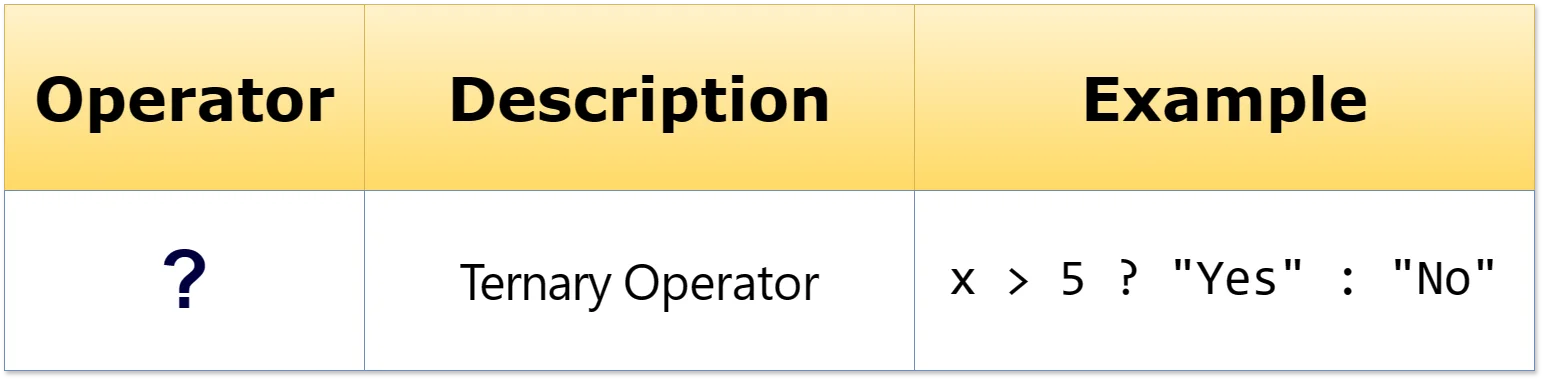
condition ? exprIfTrue : exprIfFalse; Here's how it works: condition is evaluated first. If it's true, exprIfTrue is executed. If condition is false, exprIfFalse is executed. For example:
let age = 18;
let message = (age >= 18) ? "You can vote" : "You cannot vote";
console.log(message); The typeof operator tells you what type of data something is. It returns a string like "number", "string", "boolean", or "object". Here are some examples:
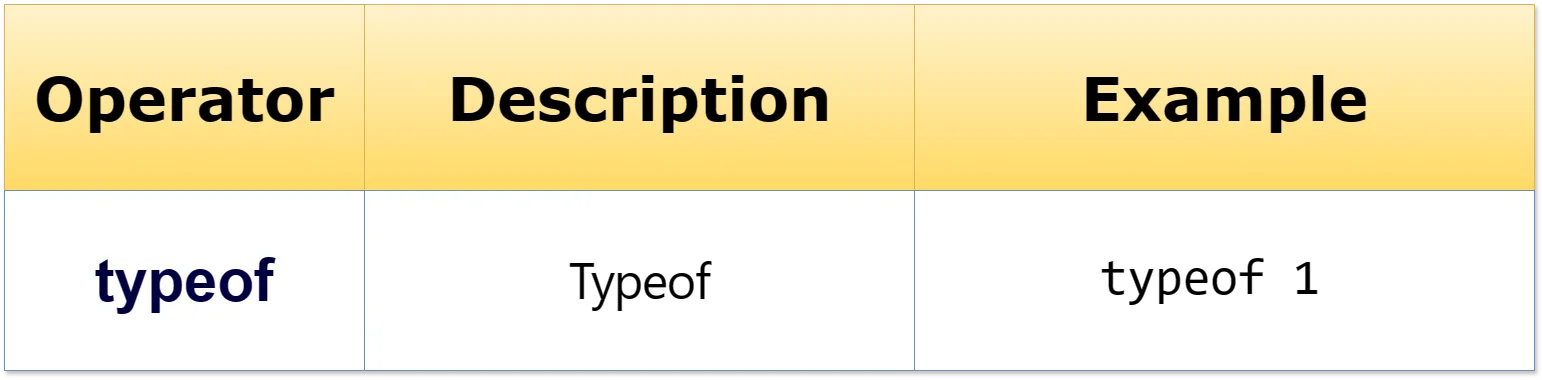
console.log(typeof 1); // 'number'
console.log(typeof 'hello'); // 'string'
console.log(typeof true); // 'boolean'
console.log(typeof {}); // 'object'
console.log(typeof []); // 'object'
console.log(typeof function() {}); // 'function'
console.log(typeof null); // 'object'
console.log(typeof undefined); // 'undefined'
console.log(typeof NaN); // 'number'
One quirk: typeof null returns "object", which is a well-known bug in JavaScript that was never fixed. Also, typeof returns "undefined" for variables that exist but haven't been given a value yet.
When an expression has multiple operators, JavaScript doesn't just read left to right. Some operators are handled before others, just like multiplication comes before addition in math class.
For example, in 1 + 2 * 3, the multiplication happens first, giving you 7 (not 9). Here is the precedence table from highest to lowest:
| Precedence | Operator | Description | Associativity |
|---|---|---|---|
| 1 | ( ) | Parentheses | n/a |
| 2 | ! ~ + - ++ -- typeof void | Unary operators | n/a |
| 3 | \ * % / | Multiplicative operators | left-to-right |
| 4 | + - | Additive operators | left-to-right |
| 5 | << >> >>> | Bitwise shift operators | left-to-right |
| 6 | < <= > >= instanceof | Relational operators | left-to-right |
| 7 | == != === !== | Equality operators | left-to-right |
| 8 | & | Bitwise AND operator | left-to-right |
| 9 | ^ | Bitwise XOR operator | left-to-right |
| 10 | | | Bitwise OR operator | left-to-right |
| 11 | && | Logical AND operator | left-to-right |
| 12 | || | Logical OR operator | left-to-right |
| 13 | ? : | Conditional operator | right to left |
| 14 | = += -= \*= /= %= <<= >>= &= ^= |= | Assignment operators | right-to-left |
//Examples
// Parentheses have the highest precedence
let result1 = 2 * (3 + 4);
console.log(result1); // Output: 14 (Parentheses evaluated first)

// Exponentiation has higher precedence than multiplication
let result2 = 2 + 3 ** 2;
console.log(result2); // Output: 11 (Exponentiation done before addition)

// Unary operators (++ and --) have higher precedence than binary operators
let a = 5;
let b = a++ * 2;
console.log(b); // Output: 10 (Postfix increment evaluated before multiplication)

// Comparison operators have lower precedence than arithmetic operators
let result3 = 5 + 3 < 2 * 4;
console.log(result3); // Output: false (Arithmetic operations evaluated before comparison)

// Logical operators have lower precedence than comparison operators
let result4 = 5 + 3 < 2 * 4 && true;
console.log(result4); // Output: true (Comparison evaluated before logical AND) When two operators have the same precedence, JavaScript evaluates them left to right (called left-to-right associativity). When in doubt, use parentheses ( ) to make the order obvious.
- Arithmetic: + - * / % ** ++ -- for basic math.
- Comparison: == === != !== > < >= <= compare values and return true or false.
- Assignment: = stores a value; += -= *= /= %= **= do math and store in one step.
- Logical: && (both true), || (at least one true), ! (flip true/false).
- Ternary: condition ? valueIfTrue : valueIfFalse is a one-line if-else.
- typeof: Returns the data type of a value as a string.
- Precedence: Determines which operators run first. Use parentheses when in doubt.
- What are operators in programming?
- What is operand?
- Explain arithmetic operators.
- Explain comparison operators.
- Explain assignment operators.
- Explain the difference between =, == and === operators.
- Explain logical operators.
- Explain the ternary operator.
- Explain typeof operator.
- Describe operator precedence in JavaScript. How does it determine the order in which operations are executed?


Operators In Javascript