JavaScript History
By now, you have a good idea of what web development is and how HTML, CSS, and JavaScript work together.
Before we move forward, let's take a quick look at where JavaScript came from. Knowing its origin story helps you understand why it works the way it does today.
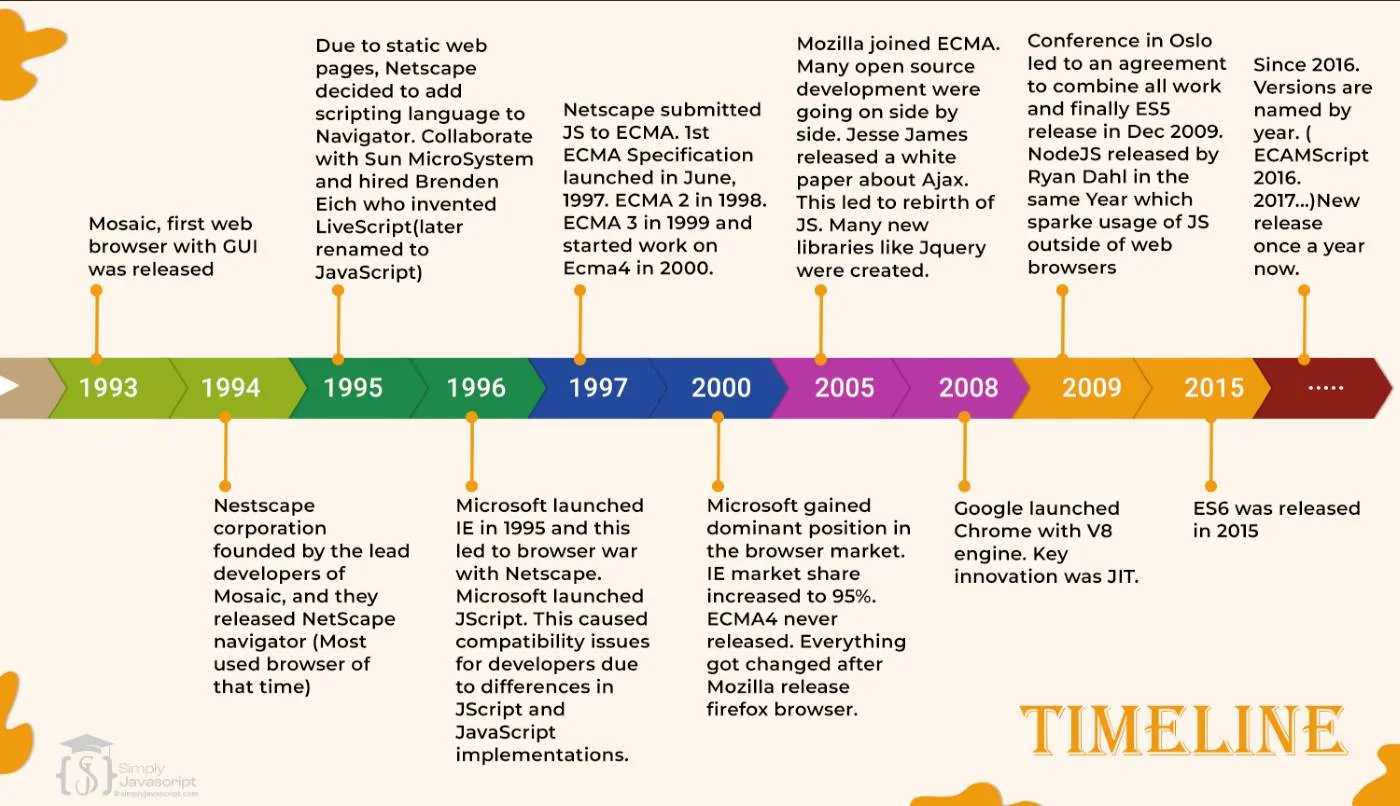
In 1995, Netscape (the company behind the popular Navigator browser) wanted to make web pages more interactive. They hired Brendan Eich, who built the first version of JavaScript in just 10 days.
The language was first called Mocha, then LiveScript, and finally JavaScript. Yes, the name was partly a marketing move to ride the popularity of Java at the time. But JavaScript and Java are completely different languages.
Then the "browser wars" started. Microsoft launched Internet Explorer with its own version of JavaScript, and things got messy. To fix compatibility problems, Netscape submitted JavaScript to ECMA International for standardization.
JavaScript development slowed in the early 2000s, but picked up again when Mozilla Firefox launched in 2004. Then in 2009, Node.js arrived and let developers use JavaScript outside the browser (on servers). In 2015, a major update called ES6 modernized the language, and it's been getting yearly updates ever since.
ECMA stands for European Computer Manufacturers Association. It's the organization that creates the official rules for JavaScript.
Think of it like this: JavaScript is the language, and ECMAScript is the rulebook that says how the language should work. Without this rulebook, every browser could interpret JavaScript differently, and your code might break depending on where it runs.
Thanks to ECMAScript, all major browsers follow the same rules. That's why JavaScript code you write today works in Chrome, Firefox, Safari, and Edge.
ECMAScript is defined by two main specifications:
- ECMA-262 - The main rulebook. It defines how JavaScript syntax, types, and features should work. Browser makers follow this when building their JavaScript engines.
- ISO/IEC 22275 - The international version of the same standard, recognized worldwide by ISO and IEC.
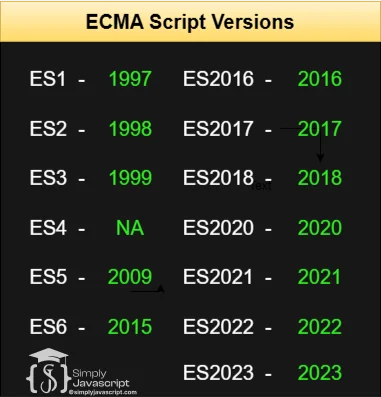
The following are the versions of ECMAScript:
- ES1 (release in 1997) - First edition
- ES2 (release in 1998) - Editorial changes
- ES3 (released in 1999) - Regular expressions, try-catch exception handling, and other features.
- ES4 - Never Released
- ES5(released in 2009) - Strict mode, JSON support, and additional methods for arrays and objects.
- ES6 (released in 2015) - Major changes such as the addition of arrow functions, template literals, and the let and const variable declarations. Note: Before 2015, ECMAScript versions were referred to as ES1, ES2, ES3, ES5, and ES6. After 2015, they were named based on their release year: ECMAScript 2016, 2017, 2018, 2019, and 2020.
- ECMAScript 2016 - Array.prototype.includes() method and the Array.prototype.padStart() and Array.prototype.padEnd() method.
- ECMAScript 2017 - Object.values(), Object.entries() and Object.getOwnPropertyDescriptors() method and async/await syntax for asynchronous programming.
- ECMAScript 2018 - Rest/Spread properties, Asynchronous Iteration, Promise.prototype.finally() method.
- ECMAScript 2020 - globalThis, nullish coalescing operator, optional chaining operator, BigInt and String.prototype.matchAll() method.
- ECMAScript 2021 - Promise.any(), String replaceAll() and Numeric Separators (_).
- ECMAScript 2022 Array at(), String at(), Object.hasOwn(), error.cause, await import, Class field declarations, and Private methods and fields.
- ECMAScript 2023 - New array methods include findLast(), findLastIndex(), toReversed(), toSorted(), and toSpliced(), with() method for arrays and shebang (#!) notation.
- ECMAScript 2024 - New grouping methods like Object.groupBy() and Map.groupBy(), Promise.withResolvers(), ArrayBuffer transfer and resize support, and new Set methods for union, intersection, difference, and subset checks.
- ECMAScript 2025 - Adds iterator helper methods such as map(), filter(), take(), and toArray(), along with support for explicit resource management using using and await using.
New versions come out every year, each adding useful features.
Note: Some older features (like var) are rarely used in modern code. In our upcoming tutorials, we'll focus on the features that developers actually use today.
JavaScript works in all major browsers: Chrome, Firefox, Safari, and Edge. Each browser has its own JavaScript engine, which is the part that reads and runs your code.
Most of the time, JavaScript behaves the same everywhere. But sometimes a newer feature might not work in an older browser. Developers handle this with tools like feature detection and polyfills (we'll cover these later).
Two key terms you'll hear about compatibility:
- Backward compatible means new browsers can still run old JavaScript code. Your old code won't break.
- Forward compatible means old browsers can handle new code gracefully (though this is harder to guarantee).
As shown below, here's how backward and forward compatibility compare across different areas:

| Topic | Backward Compatible | Forward Compatible |
|---|---|---|
| Browsers | New browsers still run old JS code. | Old browsers try to handle new features. |
| File Formats | Can still read older file formats. | Ready for newer file formats. |
| APIs | Works with older API versions. | Designed to work with future API versions. |
| Hardware | Still works on older devices. | Can take advantage of newer hardware. |
| Software | Runs with older software versions. | Ready for future software updates. |
- Brendan Eich created JavaScript in 1995 at Netscape. It was originally called Mocha, then LiveScript.
- ECMA International standardized JavaScript as ECMAScript in 1997, so all browsers follow the same rules.
- Node.js (2009) brought JavaScript to servers. ES6 (2015) was a major modernization. New versions come out yearly.
- JavaScript runs in all major browsers (Chrome, Firefox, Safari, Edge), each with its own JS engine.
- Backward compatible means new browsers still run old code. Forward compatible means old browsers try to handle new code.
What's next? Now that you know the backstory, let's set up your coding environment in the next tutorial.
- Tell us about the history of JavaScript.
- What is ECMAScript and How is it related to JavaScript?
- What are the different versions of JavaScript?
- What is ES5 and ES6?
- Describe the significance of standardization for JavaScript and how ECMA helps in this process.
- Tell about challenges arise in ensuring JavaScript compatibility across different browsers and devices?
- What are the common techniques or tools used to handle JavaScript compatibility issues between various browsers and versions.
- Explain the significance of polyfills and transpilers in dealing with JavaScript compatibility concerns. Provide examples of situations where each would be beneficial.
- How does feature detection differ from browser detection in managing JavaScript compatibility? When would you use each approach?
- What is forward compatibility?
- What is backward compatibility?
- What is ECMA-262 specification ?
- What is ISO/IEC 22275 standard ?

JavaScript Introduction & History