JavaScript String
Think of a string as a piece of text you store in your code. It can hold letters, numbers, symbols, or all of them together. You wrap strings in single quotes ('), double quotes ("), or backticks (`).
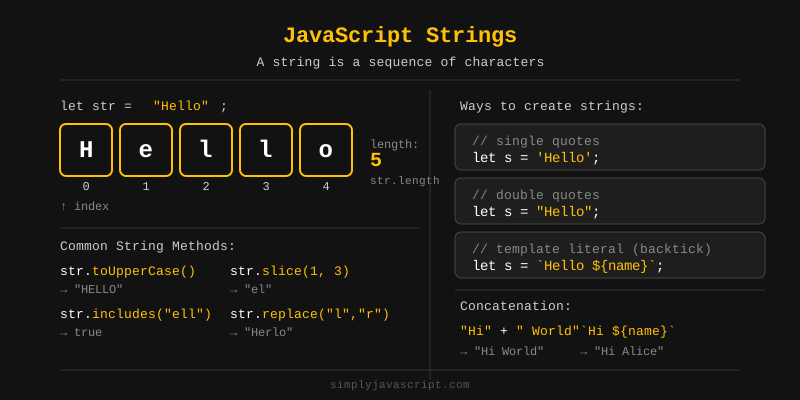
//Example
let singleQuoteString = 'Hello, World!';
let doubleQuoteString = "JavaScript is fun!";
let name = 'Alice';
let templateLiteralString = `Hello, ${name}! Welcome to JavaScript.`;
let numberString = '12345';
let multilineString = `This is a
multiline string in JavaScript.`;Both single (') and double (") quotes are used to define strings. They behave the same but the important rule is that the opening and closing quotes must match. If you start a string with a single quote, you must end it with a single quote, and the same goes for double quotes.
//Correct
let str1 = 'Hello, World!';
let str2 = "JavaScript is fun!";

//Incorrect
let str3 = "Hello, World!';
let str4 = "JavaScript is fun!';
But if you want to use single quote or double quote in a string then you can enclose it in double quotes to avoid needing an escape character, and vice versa or use escape characters (\' or \"). For example:
let str3 = "It's a sunny day.";
let str4 = 'He said, "Hello!"';
let str5 = 'It\'s a sunny day.';
let str6 = "He said, \"Hello!\"";Sometimes you need characters inside a string that would normally confuse JavaScript, like quotes or line breaks. A backslash (\) before the character tells JavaScript: "treat this as plain text." Here are the common escape characters:
- \': Single quote
- \": Double quote
- \\: Backslash
- \n: New line
- \t:Tab
- \r: Carriage return
- \b: Backspace
- \f: Form feed
let escapeExample = 'I\'m learning JavaScript.\nIt\'s fun!';
let text = "He said, \"JavaScript is awesome!\" \nAnd I couldn't agree more.";
console.log(text);

// Output:
// I'm learning JavaScript.
// It's fun!
// He said, "JavaScript is awesome!"
// And I couldn't agree more.A string literal is just text you type directly in your code, wrapped in quotes or backticks. It's the value itself, not a variable pointing to it.
let str = 'Hello World';
let funStr = "JavaScript is fun";
You'll almost always use string literals instead of string objects because they're simpler and faster. We'll cover string comparison later in this tutorial.
Want to know how many characters are in a string?
Use the .length property. It counts
everything, including spaces.
let text = 'Hello World';
console.log(text.length);  // Output: 11

console.log(text.length()); //wrong
Note: length is a property, not a function.
JavaScript lets you treat a string like an array of characters. You can grab any character using square brackets and its position number (index).
const str = "hello";
console.log(str[0]); // Output: 'h'
console.log(str[4]); // Output: 'o'
You can also loop through a string character by
character, just like you would with an array. The
for...of loop makes this really easy.
const str = "hello";
for (const char of str) {
    console.log(char);
}
// Output:
// h
// e
// l
// l
// oStrings are immutable, which means once you create one, you can't change its characters in place. To "edit" a string, you create a brand new one.
let str = "hello";
// Attempting to change a character (this won't work)
str[0] = "H";
console.log(str); // Output: 'hello'

// To change it, create a new string
str = "H" + str.slice(1);
console.log(str); // Output: 'Hello'JavaScript gives you a bunch of built-in methods to work with strings, like searching, slicing, and changing case. Let's go through them alphabetically with examples:
-
charAt() -
Returns the character at a specified index in a
string.
charAt(index) str = "Hello" +-------------------+ | H | e | l | l | o | +-------------------+ 0 1 2 3 4 "Hello".charAt(1) ? "e" "Hello".charAt(4) ? "o"//Syntax: string.charAt(index) //Example let text = 'Hello'; console.log(text.charAt(1)); // Output: 'e' -
concat() - Joins
two or more strings into one.
concat() str1 = "Hello" str2 = " " str3 = "World" +-------+ +---+ +-------+ | Hello | + | | + | World | +-------+ +---+ +-------+ | ? +-------------+ | Hello World | +-------------+//Syntax: string.concat(string2, string3, ...) //Example let str1 = 'Hello'; let str2 = 'World'; console.log(str1.concat(' ', str2)); // Output: 'Hello World' -
endsWith() -
Checks if a string ends with a specified substring.
endsWith(searchString) str = "Hello World" H e l l o W o r l d ?------------------------------? +------+ "World" ? match at end "Hello World".endsWith("World") ? true "Hello World".endsWith("Hello") ? false//Syntax: string.endsWith(searchString) //Example let text = 'Hello World'; console.log(text.endsWith('World')); // Output: true -
includes() -
Checks if a string contains a specified value.
includes(searchString) str = "Hello World" H e l l o W o r l d +------+ "World" ? found "Hello World".includes("World") ? true "Hello World".includes("world") ? false (case-sensitive)//Syntax: string.includes(searchString) //Example let text = 'Hello World'; console.log(text.includes('World')); // Output: true -
indexOf() -
Returns the index of the first occurrence of a
specified value. If not found, it returns -1.
indexOf(searchValue) str = "Hello World" +-------------------------------------------+ | H | e | l | l | o | | W | o | r | l | d | +-------------------------------------------+ 0 1 2 3 4 5 6 7 8 9 10 +---------------+ "World" starts at index 6 "Hello World".indexOf("World") ? 6 "Hello World".indexOf("xyz") ? -1//Syntax: string.indexOf(searchValue) //Example let text = 'Hello World'; console.log(text.indexOf('World')); // Output: 6 -
lastIndexOf() -
Returns the index of the last occurrence of a
specified value. If not found, returns -1.
lastIndexOf(searchValue) str = "Hello World World" 0 5 10 15 H e l l o W o r l d W o r l d ? ? index 6 index 12 ? last occurrence "Hello World World".lastIndexOf("World") ? 12 "Hello World World".indexOf("World") ? 6 (first)//Syntax: string.lastIndexOf(searchValue) //Example let text = 'Hello World World'; console.log(text.lastIndexOf('World')); // Output: 12 -
match() -
Searches a string for a match against a regular
expression and returns the matches.
match(regex) str = "The rain in Spain stays mainly in the plain" ---+ +---+ +-----+ +---+ "ain" "ain" "ain" str.match(/ain/g) ? ["ain", "ain", "ain"] ? global flag finds all matches//Syntax: string.match(regex) //Example let text = 'The rain in Spain stays mainly in the plain'; console.log(text.match(/ain/g)); // Output: ['ain', 'ain', 'ain']Note: Regex (Regular Expression) is a special pattern you write to find or match text. Think of it like a search filter for strings.
-
padEnd() - Pads
the current string from the end with another string
until it reaches the desired length.
padEnd(targetLength, padString)

 str = "Hello"   targetLength = 8   padString = "!"

 Before:          After:
 +-------+        +-------------------+
 | Hello |  ?     | Hello | ! | ! | ! |
 +-------+        +-------------------+
  length=5         length=8  (padded at end)
//Syntax: string.padEnd(targetLength, padString) //Example let text = 'Hello'; console.log(text.padEnd(8, '!')); // Output: 'Hello!!!' -
padStart() -
Pads the current string from the beginning with
another string until it reaches the desired length.
padStart(targetLength, padString)

 str = "5"   targetLength = 3   padString = "0"

 Before:   After:
 +---+     +-----------+
 | 5 |  ?  | 0 | 0 | 5 |
 +---+     +-----------+
  len=1     len=3  (padded at start)
//Syntax: string.padStart(targetLength, padString) //Example let text = '5'; console.log(text.padStart(3, '0')); // Output: '005' -
repeat() -
Repeats the string a specified number of times.
repeat(count) str = "Hi " count = 3 +----+ +----+ +----+ | Hi | + | Hi | + | Hi | +----+ +----+ +----+ | ? +----------------+ | Hi Hi Hi | +----------------+//Syntax: string.repeat(count) //Example let text = 'Hi '; console.log(text.repeat(3)); // Output: 'Hi Hi Hi ' -
replace() -
Replaces a specified value with another value in a
string.
replace(searchValue, newValue) str = "Hello World" H e l l o W o r l d +------+ "World" ? "JavaScript" | ? "Hello JavaScript"//Syntax: string.replace(searchValue, newValue) //Example let text = 'Hello World'; console.log(text.replace('World', 'JavaScript')); // Output: 'Hello JavaScript' -
search() -
Searches a string for a match using a regular
expression and returns the index of the match.
search(regex) str = "Hello World" +-------------------------------------------+ | H | e | l | l | o | | W | o | r | l | d | +-------------------------------------------+ 0 1 2 3 4 5 6 7 8 9 10 +---------------+ /World/ matches at index 6 "Hello World".search(/World/) ? 6 "Hello World".search(/xyz/) ? -1 (not found)//Syntax: string.search(regex) //Example let text = 'Hello World'; console.log(text.search(/World/)); // Output: 6 -
slice() -
Extracts a part of a string and returns it as a new
string.
slice(start, end) str = "Hello World" +-------------------------------------------+ | H | e | l | l | o | | W | o | r | l | d | +-------------------------------------------+ 0 1 2 3 4 5 6 7 8 9 10 start=0 end=5 +-------------------+ "Hello" "Hello World".slice(0, 5) ? "Hello" "Hello World".slice(6) ? "World" (to end)//Syntax: string.slice(start, end) //Example: let text = 'Hello World'; console.log(text.slice(0, 5)); // Output: 'Hello' -
split() -
Splits a string into an array of substrings based on
a specified delimiter.
split(separator) str = "a,b,c" +-------------------+ | a | , | b | , | c | +-------------------+ ? ? separator separator "a,b,c".split(",") ? ["a", "b", "c"] "Hello".split("") ? ["H","e","l","l","o"]//Syntax: string.split(separator) //Example: let text = 'a,b,c'; console.log(text.split(',')); // Output: ['a', 'b', 'c'] -
startsWith() -
Checks if a string starts with a specified
substring.
startsWith(searchString) str = "Hello World" H e l l o W o r l d +-----+ "Hello" ? match at start "Hello World".startsWith("Hello") ? true "Hello World".startsWith("World") ? false//Syntax: string.startsWith(searchString) //Example: let text = 'Hello World'; console.log(text.startsWith('Hello')); // Output: true -
substring() -
Extracts characters between two indices and returns
a new string.
substring(start, end) str = "Hello World" +-------------------------------------------+ | H | e | l | l | o | | W | o | r | l | d | +-------------------------------------------+ 0 1 2 3 4 5 6 7 8 9 10 start=0 end=5 +-------------------+ "Hello" "Hello World".substring(0, 5) ? "Hello" "Hello World".substring(6) ? "World"//Syntax: string.substring(start, end) //Example: let text = 'Hello World'; console.log(text.substring(0, 5)); // Output: 'Hello' -
toLowerCase() -
Converts a string to lowercase.
toLowerCase() str = "Hello World" +-------------------------------------------+ | H | e | l | l | o | | W | o | r | l | d | +-------------------------------------------+ ? ? lowercase lowercase +-------------------------------------------+ | h | e | l | l | o | | w | o | r | l | d | +-------------------------------------------+ Result: "hello world"//Syntax: string.toLowerCase() //Example: let text = 'Hello World'; console.log(text.toLowerCase()); // Output: 'hello world' -
toUpperCase() -
Converts a string to uppercase.
toUpperCase() str = "hello world" +-------------------------------------------+ | h | e | l | l | o | | w | o | r | l | d | +-------------------------------------------+ ? ? uppercase uppercase +-------------------------------------------+ | H | E | L | L | O | | W | O | R | L | D | +-------------------------------------------+ Result: "HELLO WORLD"//Syntax: string.toUpperCase() //Example: let text = 'hello world'; console.log(text.toUpperCase()); // Output: 'HELLO WORLD' -
trim() -
Removes whitespace from both ends of a string.
trim() str = " Hello World " +---------------------------------------+ | | | | Hello World | | | | +---------------------------------------+ ? whitespace whitespace ? +--- removed -------------- removed + | ? +---------------+ | Hello World | +---------------+//Syntax: string.trim() //Example: let text = ' Hello World '; console.log(text.trim()); // Output: 'Hello World' -
trimEnd() -
Removes whitespace from the end of a string.
trimEnd() str = "Hello World " +---------------------------+ | Hello World | | | | +---------------------------+ ? whitespace +--- removed + | ? +---------------+ | Hello World | +---------------+//Syntax: string.trimEnd() //Example: let text = 'Hello World '; console.log(text.trimEnd()); // Output: 'Hello World' -
trimStart() -
Removes whitespace from the beginning of a string.
trimStart() str = " Hello World" +---------------------------+ | | | | Hello World | +---------------------------+ ? whitespace +--- removed + | ? +---------------+ | Hello World | +---------------+//Syntax: string.trimStart() //Example: let text = ' Hello World'; console.log(text.trimStart()); // Output: 'Hello World' -
valueOf() -
Returns the primitive value of a string object.
valueOf() String Object: +-----------------------------+ | new String("Hello") | | (String wrapper object) | +-----------------------------+ | | .valueOf() ? +-----------------------------+ | "Hello" | | (primitive string value) | +-----------------------------+//Syntax: string.valueOf() //Example: let strObj = new String('Hello'); console.log(strObj.valueOf()); // Output: 'Hello'
- Strings are text values wrapped in quotes (', ", or backticks `).
- Quotes must match: start with ' and end with ', or " with ".
- Escape characters use a backslash (\) to include special characters like \n, \', \".
-
String literals are text typed
directly in your code, not created via
new String(). - .length gives you the total character count, including spaces.
- Indexing lets you access characters with [index], just like arrays.
- Immutability means you can't change a string in place. You always create a new one.
- String methods like .toUpperCase(), .slice(), and .split() return new strings and never modify the original.
What's next? Practice using string methods in the exercises and try combining them to solve real problems!
- What is a string in JavaScript?
- What are the different ways to create strings in JavaScript?
- How do you convert a number to a string in JavaScript?
- How do you convert a string to a number in JavaScript?
- What is the difference between == and === when comparing strings?
- How can you check if a string contains a specific substring?
- How do you extract a part of a string in JavaScript?
- What is the difference between slice(), substring(), and substr()?
- What are template literals and how are they different from regular strings?
- What is the difference between replace() and replaceAll()?
- How do you check if a string matches a regular expression in JavaScript?
- How do you find the first occurrence of a substring in a string?
- How do you find all occurrences of a substring in a string?
- What are Unicode and UTF-16 in the context of JavaScript strings?
- How do you convert a string to its character code and vice versa?
- How do you iterate through each character of a string?
- What is the difference between charAt() and charCodeAt()?
- What happens when you try to access a character at an index that doesn't exist?
- Is JavaScript string immutable? Explain.
- How do you handle multi-line strings in JavaScript?
- What are some performance considerations when working with strings?
- How do you use regular expressions with strings in JavaScript?
- What is the difference between match() and exec() when dealing with regular expressions?
- How do you check if a string is empty in JavaScript?
- What is a tagged template literal in JavaScript?
Videos for this topic will be added soon.