JavaScript Loop & Switch
Loops let you run the same code over and over without writing it out each time. If you need to process a list of items or repeat a task 100 times, a loop handles it for you in just a few lines.
The for loop is perfect when you know exactly how many times you want to repeat something. It has three parts all on one line:
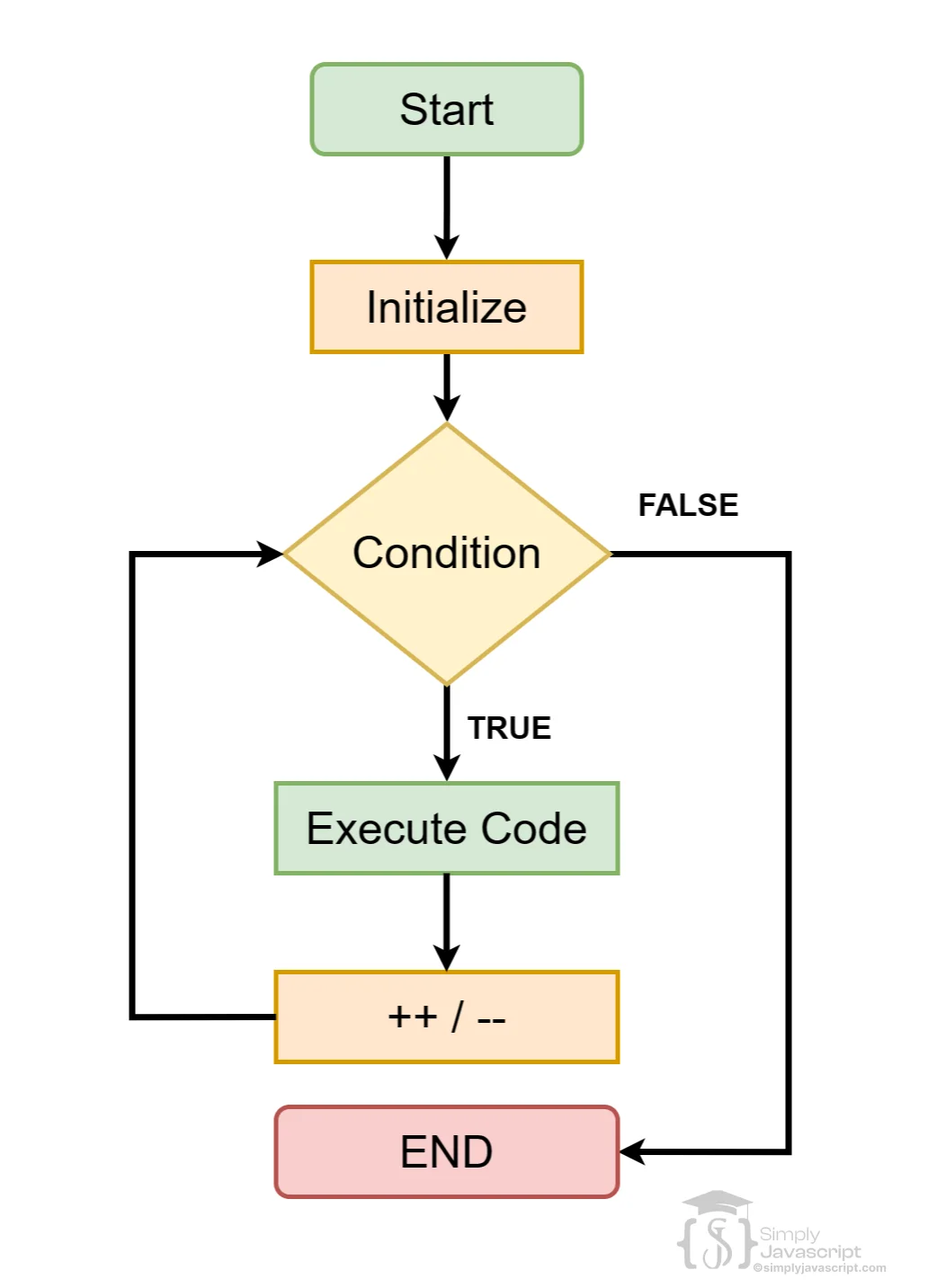
for (initialization; condition; increment/decrement) {
  // code to be executed
}
Here's a breakdown of how it works:
- Initialization: It kicks things off by setting up, usually initializing a counter variable. This part happens once at the beginning of the loop.
- Condition: On each run through the loop, this condition gets checked. If it's true, the code block inside the loop runs. If false, the loop stops.
- Increment/Decrement: After each loop iteration, this step happens. It's often used to update the counter variable, shifting it closer to the condition being false.
for (var i = 0; i < 10; i++) {
  console.log(i);
} The for...of loop is the easiest way to go through each item in an array, a string, or any other iterable. You don't need a counter variable or index:
//Syntax
for (variable of iterable) {
  // code to be executed
}

//Example:
let array = [1, 2, 3, 4, 5];
for (const item of array) {
  console.log(item);
} - variable: It represents the current item in the iteration. You assign this variable to hold the value of each item in the iterable as you loop through.
- iterable: This refers to the array, string, or any iterable object you want to loop through.
The for...in loop is designed for objects. Instead of giving you values, it gives you the keys (property names) of an object one at a time:
//Syntax
for (variable of iterable) {
  // code to be executed
}

//Example:
let array = [1, 2, 3, 4, 5];
for (const item of array) {
  console.log(item);
} - variable: It represents the current item in the iteration. You assign this variable to hold the value of each item in the iterable as you loop through.
- iterable: This refers to the array, string, or any iterable object you want to loop through.
A while loop keeps running as long as its condition is true. Unlike a for loop, you manage the counter yourself:
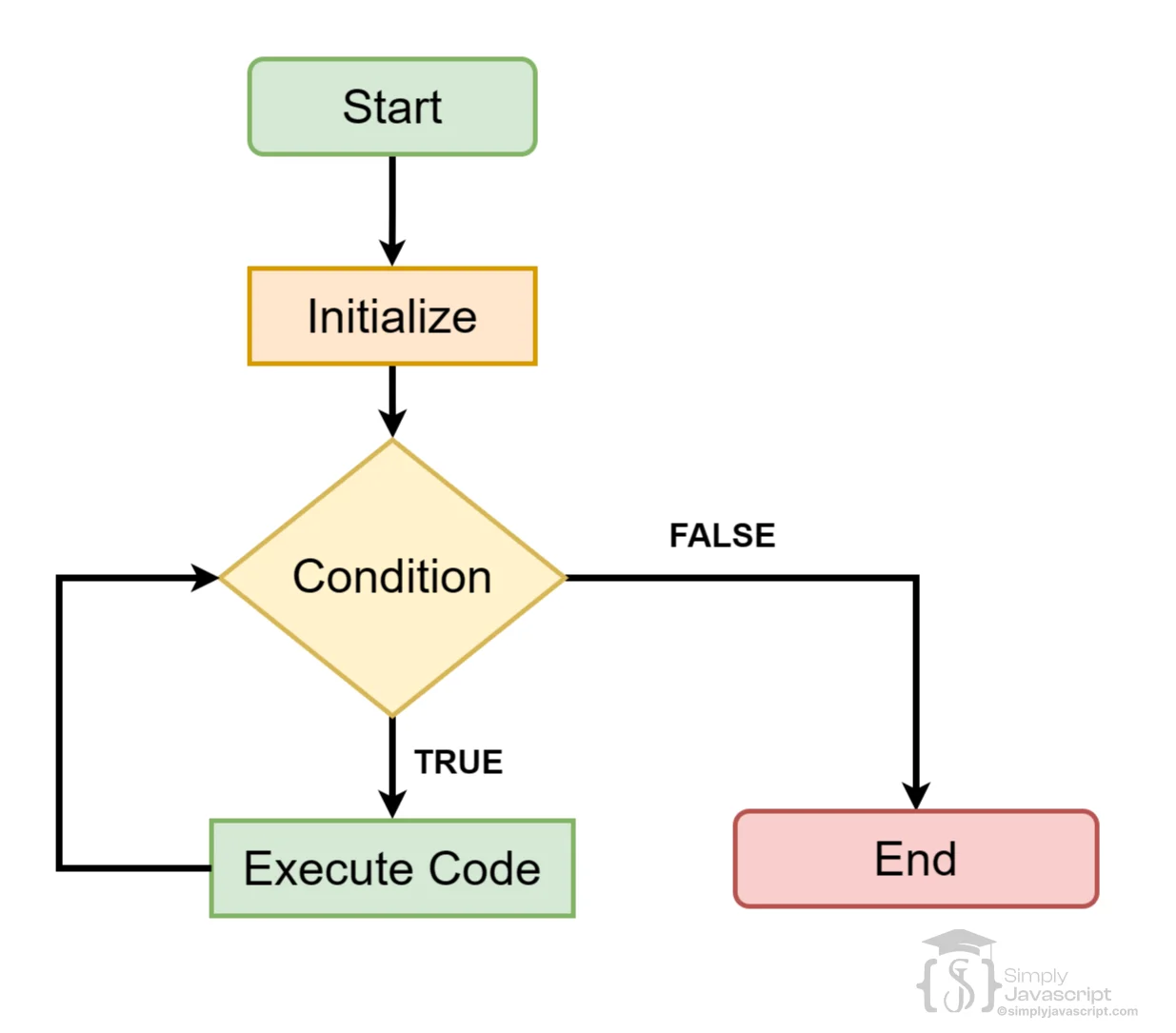
//Syntax
while (condition) {
  // code to be executed
}

//Example:
let i = 0;
while (i < 10) {
  console.log(i);
  i++;
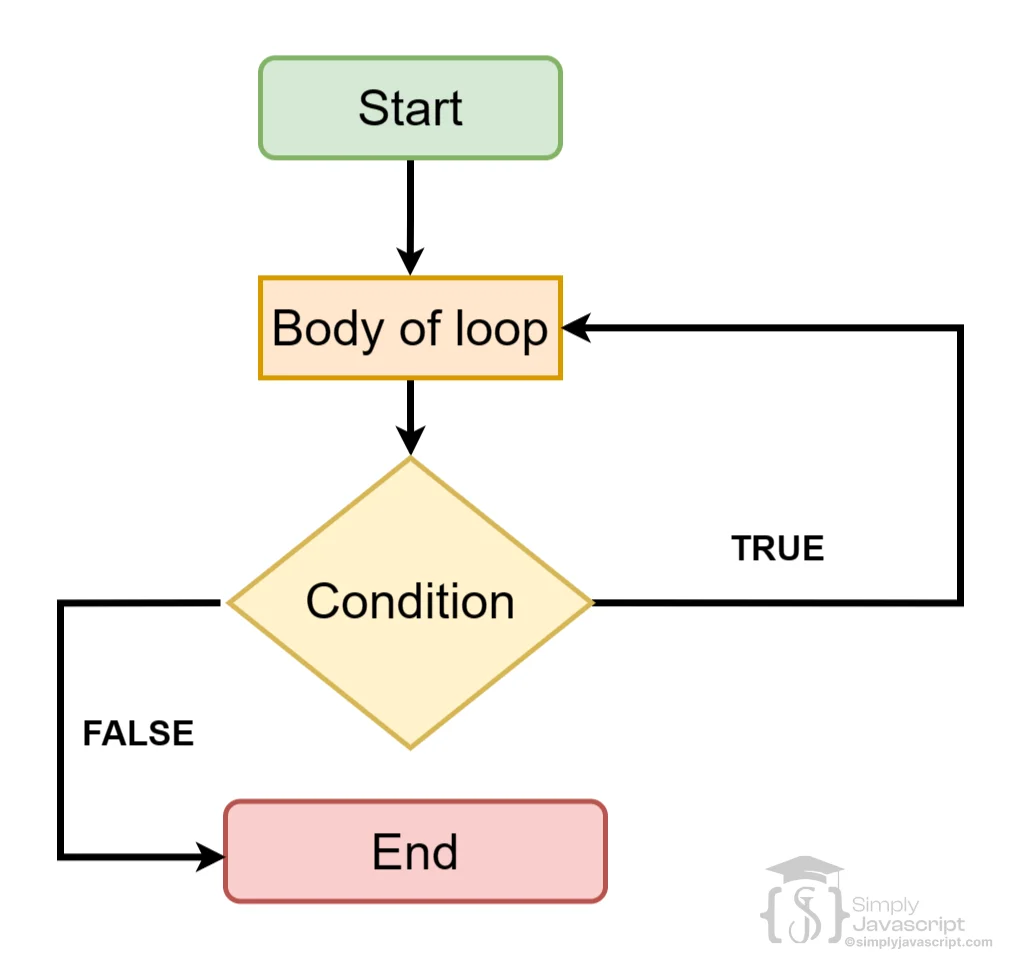
} The do...while loop in JavaScript is a lot like the while loop, but with a twist. It ensures that the code inside the loop runs at least once, even if the condition initially evaluates to false. Here's how it's structured:
//Syntax
do {
  // code to be executed
} while (condition);

//Example
let i = 0;
do {
  console.log(i);
  i++;
} while (i < 10);
The block of code inside the do runs first, unconditionally, before the condition is even checked. After the code runs for the first time, the while condition is evaluated.
A nested loop is a loop inside another loop. Every time the outer loop runs once, the inner loop runs all the way through. For example, if the outer loop runs 3 times and the inner loop runs 3 times, the code inside runs 9 times total.
for (let row = 1; row <= numRows; row++) {
  // Draw a row (outer loop)
  for (let column = 1; column <= numColumns; column++) {
    // Draw a square in the row (inner loop)
    // Draw the square at the current row and column
  }
} A switch statement checks a value against a list of possible matches and runs the code for whichever one matches. It's a cleaner alternative to writing many if...else if blocks:
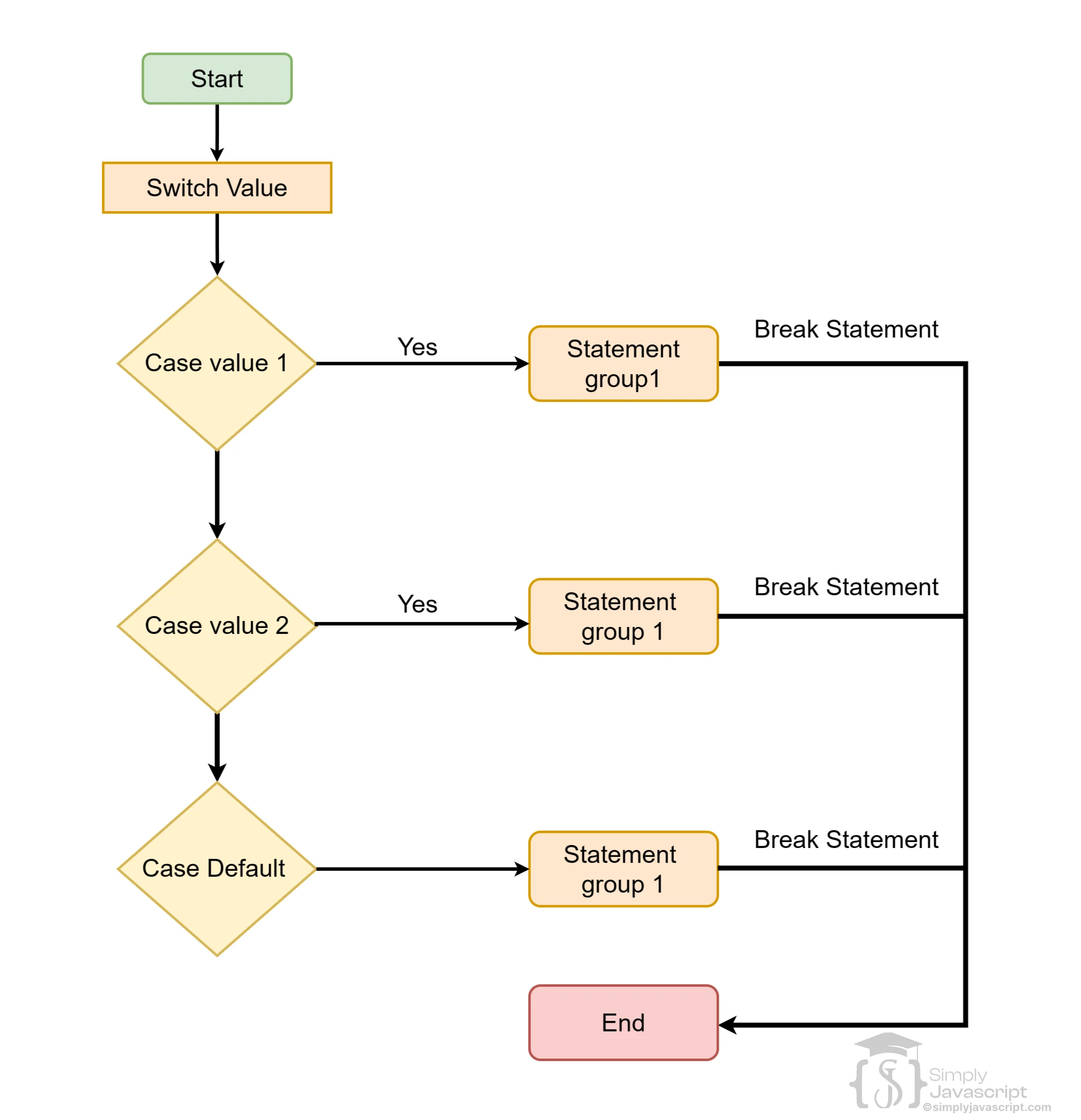
switch (expression) {
  case value1:
    // code to be executed if expression === value1
    break;
  case value2:
    // code to be executed if expression === value2
    break;
  ...
  default:
    // code to be executed if expression does not match any of the cases
}
Here is an example of a switch statement that checks the value of a variable called day and outputs a message depending on the day:
let day = "Monday";
switch (day) {
  case "Monday":
    console.log("Today is Monday.");
    break;
  case "Tuesday":
    console.log("Today is Tuesday.");
    break;
  case "Wednesday":
    console.log("Today is Wednesday.");
    break;
  case "Thursday":
    console.log("Today is Thursday.");
    break;
  case "Friday":
    console.log("Today is Friday.");
    break;
  default:
    console.log("Today is a weekend day.");
}
Always include a break after each case, otherwise JavaScript will keep running the next case even if it doesn't match (this is called "falling through"). The default case at the end handles anything that doesn't match.
Switch works best when you're comparing a single value against a list of exact matches. For ranges or complex conditions, if...else is usually a better fit.
The break keyword immediately exits a loop or switch statement. Once JavaScript hits a break, it stops the current loop and moves on to the code after it.
let grade = 'B';
switch (grade) {
  case 'A':
    console.log("Excellent");
    break;
  case 'B':
    console.log("Good");
    break;
  default:
    console.log("Invalid grade");
}

for (let i = 0; i < 10; i++) {
    if (i === 5) {
        break; // Exit the loop when i is 5
    }
    console.log(i); // Output: 0, 1, 2, 3, 4
}
console.log('Loop has been exited.');
The for loop iterates from 0 to 9, but the break statement exits the loop when i is 5, so it only prints numbers 0 through 4.
- What is a loop and what's the use of it in programming?
- Explain for loop.
- Explain the for..of loop in JavaScript. How does it differ from the traditional for loop, and what kind of collections can it iterate through?
- Explain the for..in loop in JavaScript. What does it iterate over, and how is it commonly used in object iteration?
- Explain while loop.
- Explain the difference between for loop and while loop.
- Explain the do...while loop.
- Explain nested loops.
- Explain switch statement.
- Explain the break and continue keywords.
- Explain the significance of the default case within a switch statement.
- Explain the case sensitivity of the switch statement.
- Explain the precautions or considerations to keep in mind when using "falling through" cases in a switch statement. How can this behavior impact the flow of code execution?
-
Write a nested loop to generate a square pattern of asterisks (*) with a given side length. For example, if the side length is 5, the pattern would be:
View example pattern
***** ***** ***** ***** ***** -
Create a nested loop to print a right triangle pattern using asterisks (*). For instance, if the height is 5, the pattern should look like:
View example pattern
* ** *** **** ***** -
Write a nested loop to generate an inverted right triangle pattern using asterisks (*). If the height is 5, the pattern would be:
View example pattern
***** **** *** ** * -
Create a nested loop to print a hollow rectangle pattern with asterisks (*). For example, for a rectangle of width 6 and height 4, the pattern would be:
View example pattern
****** * * * * ****** -
Generate a nested loop to print a number pyramid. For instance, for a height of 5, the pattern would be:
View example pattern
1 121 12321 1234321 123454321 -
Create a nested loop to generate a diamond pattern with asterisks (*). For instance, for a height of 5, the pattern would be:
View example pattern
    *
   ***
  *****
 *******
*********
 *******
  *****
   ***
    *

Loop & Switch In Javascript