JavaScript DataTypes
Everything in programming revolves around data: your name, your age, your bank balance, even whether a button was clicked. JavaScript needs to know what kind of data it's working with, so it can handle it correctly.
We store data in variables, and each piece of data has a type. For example, a person's age is a number, their name is a string of text, and whether they're logged in is a true/false value.
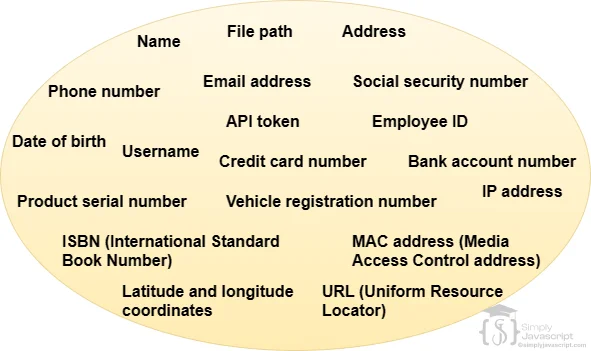
Data is just information. In JavaScript, data comes in different forms: numbers (42), text ("hello"), true/false values (true), lists (arrays), and structured bundles (objects).
Each form has a job. Numbers do math. Strings handle text. Booleans make decisions. Arrays group items together. Objects organize related pieces of data.
A value is a specific piece of data. In JavaScript, values fall into three groups:
- Primitive values: like numbers, strings, booleans etc.
- Complex values: Objects and arrays fall into this category.
- Special values: These include values, which can be used to represent missing or unknown values
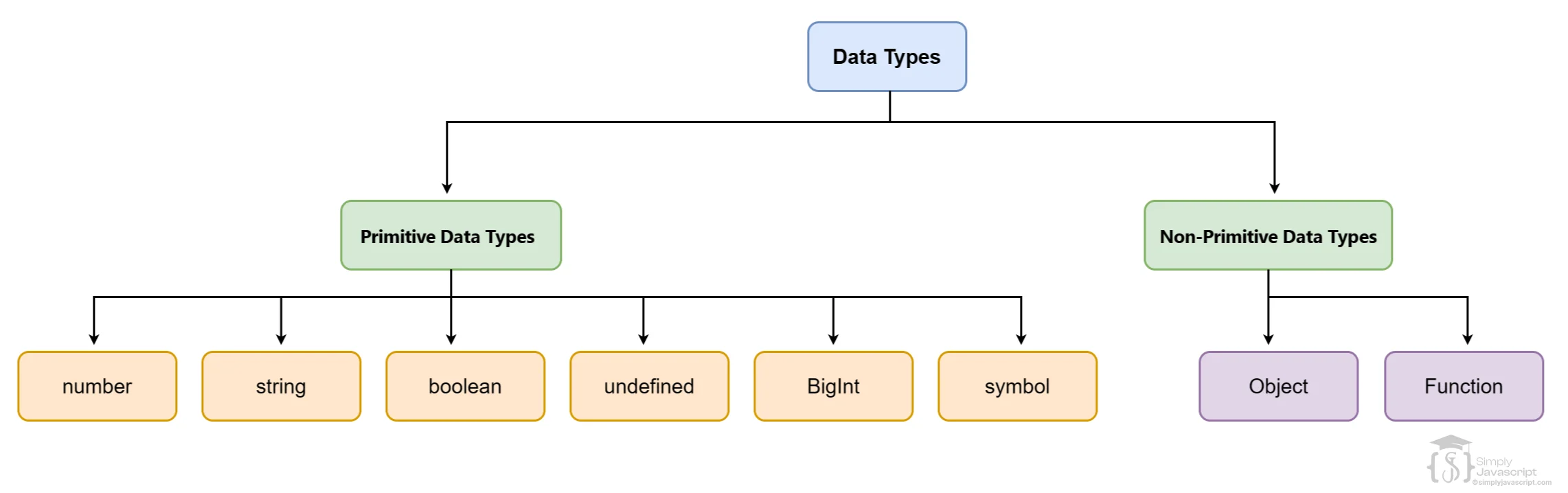
A data type tells JavaScript what kind of value something is. Is it a number? Text? True or false? JavaScript needs to know so it can handle it properly.
You can check any value's type using the typeof operator. JavaScript data types fall into two main groups:
- Primitive Data Types: The simple, basic types. These include numbers, strings, booleans, undefined, BigInt, and symbols. Each holds a single value.
- Non-Primitive values: More complex types that can hold multiple values. Functions and objects fall into this group.
console.log(typeof 1); // 'number'
console.log(typeof 'hello'); // 'string'
console.log(typeof true); // 'boolean'
console.log(typeof {}); // 'object'
console.log(typeof []); // 'object'
console.log(typeof function() {}); // 'function'
console.log(typeof null); // 'object'
console.log(typeof undefined); // 'undefined'
console.log(typeof NaN); // 'number'
Primitive data types are the simplest building blocks in JavaScript. Each one holds a single value:
- Number: Handles numeric values, whether they're whole numbers (integers) or numbers with decimals (floating-point values). Example: 10, -92, 10.50
- String: Represents sequences of characters, whether it's a word, a sentence, or even just a single letter. Strings are enclosed in single or double quotes. Example: "SimplyJavaScript", 'John'.
- Boolean: Holds either true or false. It's the language's decision maker, determining what's right and what's wrong. Example: true, false.
- Symbol: Represents unique and unchangeable values. It's like a secret code that no one can replicate. Example: Symbol("A")
- undefined: Shows up when a value hasn't been assigned yet. It's like an empty slot, waiting to be filled. Example: undefined
- BigInt: Handles really, really big integers beyond what regular numbers can manage. Example: BigInt(9454354354354354355)
Non-primitive data types are more complex. They can hold multiple values or even other data types:
- Object: Represents a collection of key-value pairs. Objects are enclosed in curly braces and can hold a mix of different data types.
- Function: Represents a block of code that can be executed/called/invoked.
// Object

let obj = {
  myName: "learnjavascript",
  age: 21
};

// function

function sum() {
  console.log(1+2);
}
In JavaScript, every value is either truthy or falsy. When JavaScript checks a condition (like in an if statement), it treats values as either true or false.
Most values are truthy. Only six values are falsy:
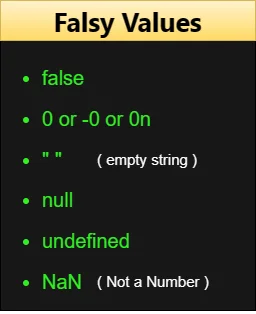
Anything not on that list is truthy. Knowing which values are falsy helps you write better conditions. For example:
if (NaN) {
  console.log("Yes");
} else {
  console.log("No"); //Answer : because NaN is a falsy value
}
if (10) {
  console.log("Yes"); //Answer : because 10 is a truthy value
} else {
  console.log("No");
} Type coercion is when JavaScript automatically converts one data type to another. This happens when you mix types in an operation.
For example, if you add a number to a string (10 + "20"), JavaScript converts the number to a string and joins them: "1020". Or if you subtract a string from a number (10 - "5"), it converts the string to a number: 5.
Coercion can be useful, but it can also surprise you. Understanding how it works helps you avoid unexpected bugs.
//Examples

//The Number 10 is converted to string '10' and then '+' concatenates both strings
var x = 10 + "20";
var y = "20" + 10;

//The Boolean value true is converted to string 'true' and then '+'concatenates both the strings
var z = true + "10";
console.log(x, y, z); //1020 2010 true10

//string to number conversion
var w = 10 - "5";
var x = 10 * "5";
var y = 10 / "5";
var z = 10 % "5";

console.log(w, x, y, z); //5 50 2 0

//The Boolean value true is converted to number 1 and then operation is performed
var x = true + 2;

//The Boolean value false is converted to number 0 and then operation is performed
var y = false + 2;
console.log(x, y); // 3 2 Sometimes you want to convert a value yourself, instead of letting JavaScript guess. Use these built-in functions:
Number("42")converts a string to a numberString(42)converts a number to a stringBoolean(1)converts a value to true or false
This gives you full control over types, so there are no surprises.
//number to boolean
let ans = Boolean(10);
console.log(ans); //true

ans = Boolean(0);
console.log(ans); //false

//number to string
ans = String(10);
console.log(ans); //'10'

//string to number
let x = "20";
console.log(Number(x) + 20);
console.log(+x); //another way to convert string to number

ans = Number("learnjavascript"); //Wrong Conversion
console.log(ans); //Not a Number (NaN)

//string to boolean
ans = Boolean('Simply');
console.log(ans); //true

ans = Boolean('');
console.log(ans); //false- Data is information. JavaScript has different types for different kinds of data.
- Primitive types: Number, String, Boolean, undefined, BigInt, Symbol. Each holds a single value.
- Non-primitive types: Objects and Functions. These can hold multiple values.
-
Truthy/Falsy: JavaScript treats most values as true. Only
false,0,"",null,undefined, andNaNare falsy. -
Coercion: JavaScript auto-converts types when you mix them (like
10 + "20"becoming"1020"). -
Manual conversion: Use
Number(),String(), orBoolean()to convert values yourself.
What's next? Now that you understand data types and conversions, let's see how JavaScript shows results in the next tutorial.
- Define 'data' and 'value' in programming. How are they related to each other?
- What is Data type?
- What role do data types play in handling values within a program?
- What are the different types of data types in JavaScript?
- What are the differences between Primitive and Non-primitive data types ?
- Explain the concept of truthy and falsy values in JavaScript. Can you provide examples of values that are considered truthy and falsy?
- Explain type coercion in JavaScript. How does implicit coercion differ from explicit coercion?
- Explain manual type conversion.

Datatype In Javascript