JavaScript Set
Think of a Set like a guest list where no name can appear twice. It's a collection of unique values, and if you try to add a duplicate, JavaScript just ignores it.
You can store any type of value in a Set: numbers, strings, objects, you name it. Whenever you need a list with zero duplicates, a Set is your go-to.
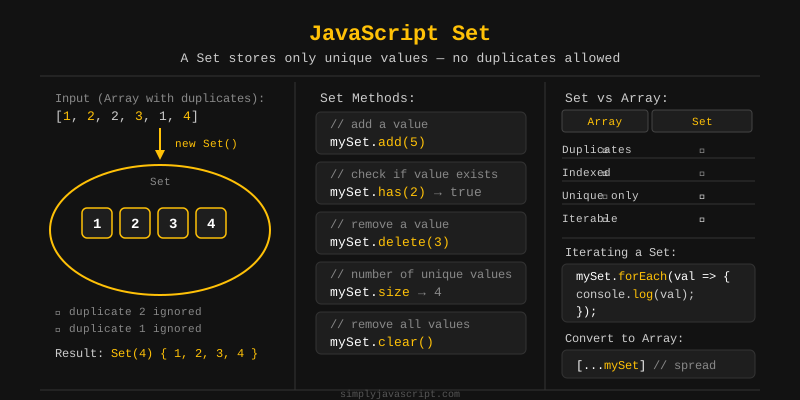
const mySet = new Set([1, 2, 3, 2, 1]);

console.log(mySet); // Set(3) { 1, 2, 3 }
// Duplicates are automatically removed
To create a Set, use new Set(). You can pass in an array to start with some values, or create an empty Set and add to it later.
// Empty Set
const emptySet = new Set();
emptySet.add(10);
emptySet.add(20);
console.log(emptySet); // Set(2) { 10, 20 }

// Set from an array
const numSet = new Set([1, 2, 3]);
console.log(numSet); // Set(3) { 1, 2, 3 }

// Duplicate values are ignored
const colors = new Set(["red", "blue", "red", "green"]);
console.log(colors); // Set(3) { 'red', 'blue', 'green' }Sets remember the order you added things. The first value you put in comes out first when you loop through. This is called insertion order.
Unlike plain objects (where property order can sometimes be unpredictable), a Set always keeps your values in the exact order you added them.
const mySet = new Set();
mySet.add("banana");
mySet.add("apple");
mySet.add("cherry");

// Values come out in insertion order
for (const fruit of mySet) {
  console.log(fruit);
}
// banana
// apple
// cherrySets come with a handful of handy methods (plus one property). Here's a quick overview:
size- returns the number of elements (property, not a method).add(value)- adds a new value to the Set.has(value)- returnstrueif the value exists.delete(value)- removes a specific value.clear()- removes all values from the Set.forEach(callback)- iterates over each value.values()- returns an iterator of all values.
Let's go through each one with examples.
size tells you how many values are in your Set. It's a property, not a method, so you write mySet.size without parentheses.
This is similar to array.length in arrays. The count updates automatically when you add or remove values.
const mySet = new Set([10, 20, 30, 20]);

console.log(mySet.size); // 3 (not 4, because 20 is a duplicate)

mySet.add(40);
console.log(mySet.size); // 4

mySet.delete(10);
console.log(mySet.size); // 3
Want to know if a value is in your Set? That's what has() is for. It returns true if the value exists and false if it doesn't.
Bonus: has() on a Set is faster than indexOf() or includes() on a large array, because Sets are optimized for quick lookups behind the scenes.
const fruits = new Set(["apple", "banana", "cherry"]);

console.log(fruits.has("banana")); // true
console.log(fruits.has("mango"));  // false
Use delete() to remove a value from your Set. It returns true if the value was found and removed, or false if it wasn't there.
const nums = new Set([1, 2, 3, 4]);

console.log(nums.delete(3)); // true  - 3 was removed
console.log(nums.delete(9)); // false - 9 was not in the Set

console.log(nums); // Set(3) { 1, 2, 4 }
Two more commonly used Set methods are add() and clear().
add(value) puts a new value into your Set. If the value already exists, nothing happens (no error). clear() wipes everything out and leaves the Set empty.
const mySet = new Set();

// add()
mySet.add("a");
mySet.add("b");
mySet.add("a"); // duplicate, ignored
console.log(mySet); // Set(2) { 'a', 'b' }

// clear()
mySet.clear();
console.log(mySet);      // Set(0) {}
console.log(mySet.size); // 0
The add() method returns the Set itself, so you can chain multiple add() calls together: mySet.add(1).add(2).add(3).
Sets do not support indexes. Unlike arrays, you cannot access a Set element by its position using bracket notation like mySet[0].
That's on purpose. Sets are built for answering "is this value in here?" not "what's at position 3?" If you need index access, convert the Set to an array first.
const mySet = new Set([10, 20, 30]);

// This does NOT work - Sets have no index
console.log(mySet[0]); // undefined

// Convert to array first if you need index access
const arr = [...mySet];
console.log(arr[0]); // 10
console.log(arr[1]); // 20
The easiest way to loop through a Set is with a for...of loop. You'll get each value in the order it was added.
const languages = new Set(["JavaScript", "Python", "Java"]);

for (const lang of languages) {
  console.log(lang);
}
// JavaScript
// Python
// Java
You can also use set.values() to get an iterator and loop over that instead. Either way, you get the same result.
const nums = new Set([5, 10, 15]);

for (const val of nums.values()) {
  console.log(val);
}
// 5
// 10
// 15
You can turn a Set into a regular array in two ways: the spread operator ([...set]) or Array.from(). Both do the same thing.
Why convert? Because Sets don't have map(), filter(), or reduce(). Turn it into an array and you get all those methods back.
const mySet = new Set([1, 2, 3, 4]);

// Using spread operator
const arr1 = [...mySet];
console.log(arr1); // [1, 2, 3, 4]

// Using Array.from()
const arr2 = Array.from(mySet);
console.log(arr2); // [1, 2, 3, 4]

// Practical use - remove duplicates from an array
const withDups = [1, 2, 2, 3, 3, 4];
const unique = [...new Set(withDups)];
console.log(unique); // [1, 2, 3, 4]
forEach() lets you run a function on every value in the Set, one at a time, in the order they were added.
Fun quirk: the callback gets the same value as both its first and second argument. This matches how Map.forEach() works. The third argument is the Set itself.
const colors = new Set(["red", "green", "blue"]);

colors.forEach(function(value) {
  console.log(value);
});
// red
// green
// blue

// Using arrow function
colors.forEach(color => console.log(color.toUpperCase()));
// RED
// GREEN
// BLUEA WeakSet is like a Set with two restrictions: it can only store objects (no strings or numbers), and it holds weak references to them.
What does "weak" mean here? Think of it like a sticky note on an object. If the object gets thrown away (no other variable points to it), the sticky note disappears too. You also can't loop over a WeakSet, and it has no size property.
const ws = new WeakSet();

let obj1 = { name: "Alice" };
let obj2 = { name: "Bob" };

ws.add(obj1);
ws.add(obj2);

console.log(ws.has(obj1)); // true

obj1 = null; // obj1 can now be garbage collected

// WeakSet only supports: add(), has(), delete()
// ws.size and for...of are NOT available
WeakSets are handy when you want to "tag" objects (like DOM elements) without keeping them alive in memory after they're no longer used.
Let's wrap up everything we covered:
- A Set stores unique values - no duplicates allowed.
- Sets maintain insertion order.
sizeis a property that returns the count of elements.add(),has(),delete(), andclear()are the core methods.- Use
for...oforforEach()to iterate over values. - Convert a Set to an array with
[...set]orArray.from(set). - Sets do not support index-based access.
- A WeakSet holds weak references to objects and is not iterable.
What's next? Now that you understand Sets, let's move on to key-value collections with the next tutorial.
Videos for this topic will be added soon.