JavaScript Scopes
Scope controls where your variables live and where you can use them. Picture a room with walls: variables created inside that room stay inside it.
Once you understand scope, you'll avoid a whole category of bugs where variables get changed from places you didn't expect.
// 'name' is accessible here because it is in the global scope
let name = "JavaScript";

function greet() {
  // 'name' is accessible inside this function too
  console.log("Hello, " + name);
}

greet(); // Output: Hello, JavaScriptScoping is how JavaScript figures out which variable you mean. When your code runs, the engine follows a set of rules to find the right variable.
It works like a search: JavaScript checks the current scope first, then moves outward one level at a time until it reaches the global scope. If it still can't find the variable, you get a ReferenceError.
let language = "JavaScript";

function outer() {
  let framework = "React";

  function inner() {
    // 'inner' can access 'framework' from outer() and 'language' from global scope
    console.log(language);  // Output: JavaScript
    console.log(framework); // Output: React
  }

  inner();
}

outer();JavaScript uses lexical scoping (also called static scoping). This means where you write your code decides the scope, not where you call it from.
A function can always reach variables in its own scope and any parent scope where it was defined. This is what makes closures work in JavaScript.
function outerFunction() {
  let outerVar = "I am from outer function";

  function innerFunction() {
    // innerFunction can access outerVar because of lexical scoping
    console.log(outerVar);
  }

  return innerFunction;
}

const myFunc = outerFunction();
myFunc(); // Output: I am from outer function
Notice that innerFunction can still
reach outerVar even after
outerFunction has finished running.
Lexical scoping remembers the scope where the
function was originally written.
JavaScript has three main types of scope:
- Global Scope: Variables declared outside any function or block.
-
Functional Scope: Variables
declared inside a function using
var,let, orconst. -
Block Scope: Variables declared
inside a block (
{}) usingletorconst.
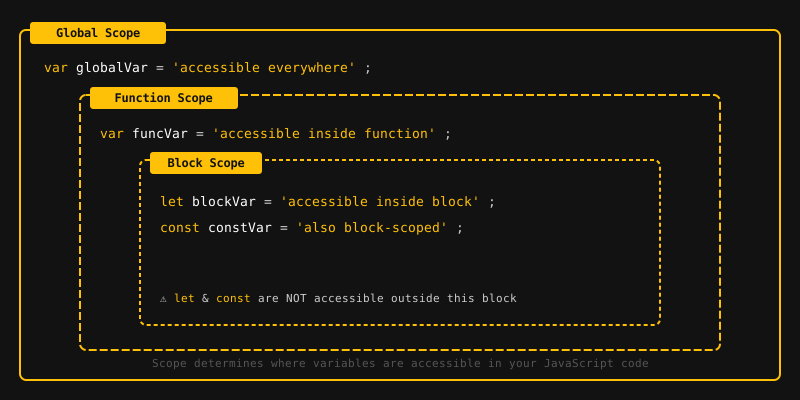
Let's look at each type in detail.
When you declare a variable outside of any function or block, it has global scope. That means every part of your program can read and use it.
// Global variable
let color = "blue";

function printColor() {
  console.log(color); // Output: blue
}

printColor();
console.log(color); // Output: blue
Global variables are handy for sharing data, but too many of them can cause naming conflicts and sneaky bugs. Try to keep them to a minimum.
If you create a variable inside a function, it has functional scope (also called local scope). Only code inside that function can see it. Outside the function, it doesn't exist.
function showMessage() {
  let message = "Hello from inside the function!";
  console.log(message); // Output: Hello from inside the function!
}

showMessage();
console.log(message); // ReferenceError: message is not defined
It doesn't matter whether you use var,
let, or const. If you
declare a variable inside a function, it stays
inside that function.
Functional scope also means nested functions can access variables from their parent function:
function outer() {
  let x = 10;

  function inner() {
    let y = 5;
    console.log(x + y); // Output: 15
  }

  inner();
  console.log(y); // ReferenceError: y is not defined
}

outer();
ES6 introduced block scope with
let and const. A "block"
is any code wrapped in curly braces
{}, like if statements,
for loops, or while loops.
Variables you create with let or
const inside a block stay inside that
block. But var ignores block
boundaries. It's function-scoped instead.
if (true) {
  let a = 10;
  const b = 20;
  var c = 30;
}

console.log(c); // Output: 30 (var is NOT block-scoped)
console.log(a); // ReferenceError: a is not defined
console.log(b); // ReferenceError: b is not defined
Here is another example using a for
loop:
for (let i = 0; i < 3; i++) {
  console.log(i); // Output: 0, 1, 2
}

console.log(i); // ReferenceError: i is not defined

// Compare with var
for (var j = 0; j < 3; j++) {
  console.log(j); // Output: 0, 1, 2
}

console.log(j); // Output: 3 (var is NOT block-scoped)
Stick with let and const
over var whenever you can. Block
scoping keeps your code predictable and much
easier to debug.
- Scope determines where a variable can be accessed in your code.
- Scoping is the process the engine uses to look up variables.
- Lexical scoping means scope is determined by where the code is written, not where it is called.
- Global scope: variables declared outside any function or block, accessible everywhere.
- Functional scope: variables declared inside a function, accessible only within that function.
-
Block scope: variables declared
with
letorconstinside a block ({}), accessible only within that block. -
varis function-scoped, whileletandconstare block-scoped.
What's next? Now that you understand where variables live, let's start working with reusable code in the next tutorial.
Videos for this topic will be added soon.