JavaScript Objects
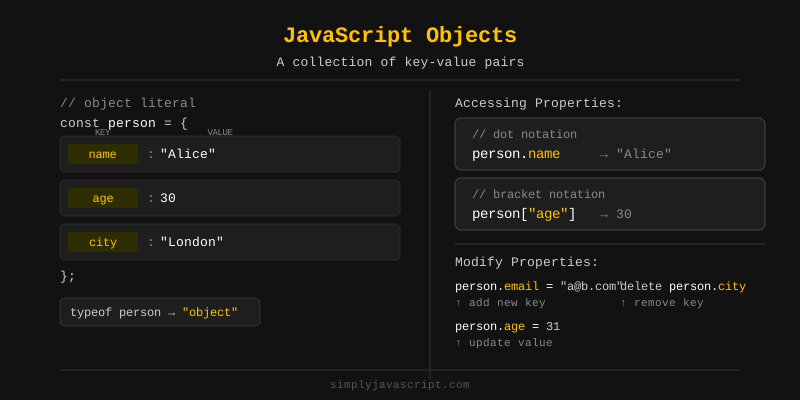
An object lets you group related data together using key-value pairs. Think of it like a contact card: a person has a name, an age, and a city, and you keep all of that info in one place.
You'll use objects everywhere in JavaScript. Once you get comfortable with them, a huge part of the language will start to click.
const car = {
  brand: "Toyota",
  color: "red",
  speed: 120
};

console.log(car); // { brand: 'Toyota', color: 'red', speed: 120 }
There are two common ways to create an object in JavaScript. The most popular and recommended way is the object literal syntax using curly braces {}.
Object Literal Syntax
You write the object directly using { key: value } pairs separated by commas. This is the simplest and most readable way to create objects.
// Object literal syntax
const person = {
  name: "Alice",
  age: 25,
  city: "New York"
};
Using the new Keyword
You can also create an object using new Object(). This is less common, but produces the same result as the literal syntax.
// Using new Object()
const person = new Object();
person.name = "Alice";
person.age = 25;

console.log(person); // { name: 'Alice', age: 25 }
In practice, the object literal syntax is preferred because it is shorter and easier to read.
Once you have an object, you can read its properties in two ways - using dot notation or bracket notation.
Dot Notation
Dot notation is the most common way. You write the object name, a dot, and the property name.
const person = { name: "Alice", age: 25 };

console.log(person.name); // Alice
console.log(person.age);  // 25
Bracket Notation
Bracket notation uses square brackets with the property name as a string. It is useful when the property name is stored in a variable or contains special characters.
const person = { name: "Alice", age: 25 };

console.log(person["name"]); // Alice

// Useful when the key is in a variable
const key = "age";
console.log(person[key]); // 25Each item inside an object is called a property. A property has two parts - a key and a value.
Key
The key is the name you use to identify the property. It is always a string (or Symbol), even if you write it without quotes.
Value
The value can be any valid JavaScript type - a string, number, boolean, array, another object, or even a function.
const product = {
  name: "Laptop",    // key: name,  value: "Laptop"
  price: 999,        // key: price, value: 999
  inStock: true      // key: inStock, value: true
};

// You can add or update a property at any time
product.discount = 10;
product.price = 899;

console.log(product.price);    // 899
console.log(product.discount); // 10An object property can hold an array as its value. This is useful when one property represents a list of items.
const student = {
  name: "Bob",
  grades: [85, 90, 78, 92]
};

console.log(student.grades);     // [85, 90, 78, 92]
console.log(student.grades[0]);  // 85 (first item)
You access the array using dot notation, then use a numeric index inside square brackets to get a specific item from the array.
You can also store a function inside an object. When you do, it's called a method. Methods let your objects do things, not just hold data.
const person = {
  name: "Alice",
  greet: function() {
    console.log("Hello, my name is Alice!");
  }
};

person.greet(); // Hello, my name is Alice!
You call a method the same way you access a property - using dot notation followed by parentheses ().
Inside a method, this is a shortcut that points back to the object the method belongs to. It lets you grab other properties of the same object without repeating its name.
const person = {
  name: "Alice",
  age: 25,
  greet: function() {
    console.log("Hi, I am " + this.name + " and I am " + this.age + " years old.");
  }
};

person.greet(); // Hi, I am Alice and I am 25 years old.
Using this instead of the object name directly makes the method flexible. If you rename the object variable, the method still works correctly.
Note
Avoid using arrow functions as object methods if you need this. Arrow functions do not have their own this - they inherit it from the surrounding scope, which may not be the object.
JavaScript gives you a few handy built-in helpers for working with objects. The three you'll use most often are Object.keys(), Object.values(), and Object.entries().
- Object.keys() - returns an array of all the property keys (names).
- Object.values() - returns an array of all the property values.
- Object.entries() - returns an array of
[key, value]pairs.
These methods are very handy when you need to loop through an object or inspect its contents.
Pass an object to Object.keys() and you'll get back an array of all its property names.
const user = {
  name: "Alice",
  age: 25,
  city: "Paris"
};

const keys = Object.keys(user);
console.log(keys); // ['name', 'age', 'city']
The returned array contains the keys in the order they were added to the object. You can use .length on the result to count how many properties an object has.
Object.values() works like Object.keys(), but instead of returning the keys, it returns an array of all the property values.
const user = {
  name: "Alice",
  age: 25,
  city: "Paris"
};

const values = Object.values(user);
console.log(values); // ['Alice', 25, 'Paris']
This is handy when you need to work with just the data inside an object without caring about the property names.
Object.entries() gives you both sides at once. You get an array where each item is a small [key, value] pair.
const user = {
  name: "Alice",
  age: 25,
  city: "Paris"
};

const entries = Object.entries(user);
console.log(entries);
// [['name', 'Alice'], ['age', 25], ['city', 'Paris']]
Object.entries() is especially useful when you want to loop over an object and need both the key and the value at the same time.
Objects are not directly iterable with a for...of loop, but you can combine it with Object.entries() to loop over all key-value pairs. You can use destructuring to unpack each pair neatly.
const user = {
  name: "Alice",
  age: 25,
  city: "Paris"
};

for (const [key, value] of Object.entries(user)) {
  console.log(key + ": " + value);
}
// name: Alice
// age: 25
// city: Paris
This pattern is clean and readable. You can also use Object.keys() or Object.values() with for...of if you only need one side of the pair.
- Object - a collection of key-value pairs used to group related data.
- Object literal - the most common way to create an object using
{}. - new Object() - an alternative way to create an object using the constructor.
- Dot notation -
obj.key- the standard way to access a property. - Bracket notation -
obj["key"]- useful when the key is dynamic or contains special characters. - Key - the name of a property; always a string internally.
- Value - the data stored in a property; can be any JavaScript type.
- Array in object - a property whose value is an array.
- Method - a function stored as a property of an object.
this- inside a method, refers to the object the method belongs to.- Object.keys() - returns an array of all property names.
- Object.values() - returns an array of all property values.
- Object.entries() - returns an array of
[key, value]pairs. - for...of with Object.entries() - a clean way to loop over all properties of an object.
What's next?
Now that you can group data with objects, let's look at JavaScript Sets, which store collections of unique values.
- What is an object in JavaScript and how do you create one?
- What is the difference between dot notation and bracket notation when accessing object properties?
-
What does the
thiskeyword refer to inside an object method? - What is the difference between Object.keys(), Object.values(), and Object.entries()?
Videos for this topic will be added soon.