JavaScript Numbers and Dates
In JavaScript, there is only one number type for both integers and decimals. Whether you write 5 or 5.5, both are of type number.
let age = 25;
let price = 9.99;

console.log(typeof age);   // number
console.log(typeof price); // number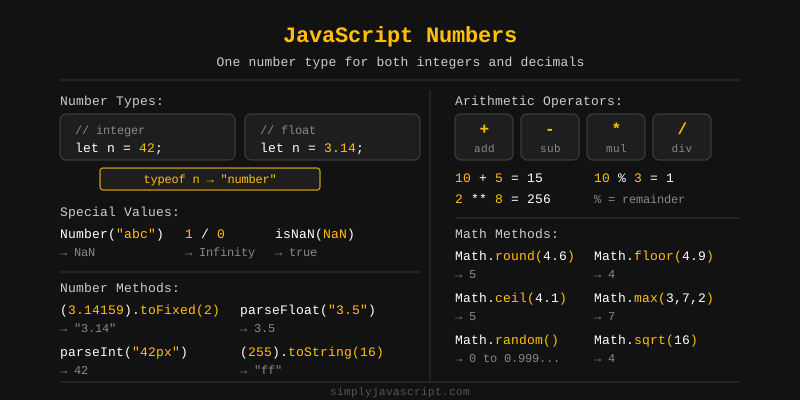
JavaScript stores all numbers as 64-bit floating point values (following the IEEE 754 standard). This means that sometimes arithmetic with decimals can give surprising results.
console.log(0.1 + 0.2); // 0.30000000000000004 (not exactly 0.3)

// Fix: round the result
console.log((0.1 + 0.2).toFixed(1)); // "0.3"
This is not a bug in JavaScript. It is a natural result of how floating point numbers are stored in binary.
You often need to convert strings to numbers or numbers to strings. JavaScript provides several ways to do this.
// String to Number
console.log(Number("42"));    // 42
console.log(Number("3.14"));  // 3.14
console.log(Number(""));      // 0
console.log(Number("abc"));   // NaN

// Number to String
console.log(String(42));      // "42"
console.log((42).toString()); // "42"

// Unary + operator (quick conversion)
console.log(+"55");  // 55
console.log(+""); // 0JavaScript supports four number systems using special prefixes. All of them are stored as regular numbers internally.
Binary (Base 2)
Uses digits 0 and 1. Prefix: 0b
let binary = 0b1010; // binary for 10
console.log(binary); // 10
Octal (Base 8)
Uses digits 0 to 7. Prefix: 0o
let octal = 0o17; // octal for 15
console.log(octal); // 15
Decimal (Base 10)
The everyday number system we use. No prefix needed.
let decimal = 255;
console.log(decimal); // 255
Hexadecimal (Base 16)
Uses digits 0-9 and letters a-f. Prefix: 0x. Widely used in colors and memory addresses.
let hex = 0xff; // hexadecimal for 255
console.log(hex); // 255Sometimes you need to check if a value is actually a number, or if it's an integer, or if it's finite. JavaScript gives you a few handy methods for this.
console.log(Number.isNaN(NaN));       // true
console.log(Number.isNaN(42));        // false
console.log(Number.isNaN("hello"));   // false (use this over global isNaN)

console.log(Number.isFinite(100));    // true
console.log(Number.isFinite(Infinity)); // false

console.log(Number.isInteger(5));     // true
console.log(Number.isInteger(5.5));   // false
Always prefer Number.isNaN() over the global isNaN(), because the global version coerces the value to a number first, which can give unexpected results.
The Math object is your toolbox for common math operations like rounding, square roots, powers, and random numbers.
console.log(Math.round(4.5));  // 5  (rounds to nearest integer)
console.log(Math.floor(4.9));  // 4  (rounds down)
console.log(Math.ceil(4.1));   // 5  (rounds up)
console.log(Math.trunc(4.7));  // 4  (removes decimal part)

console.log(Math.sqrt(16));    // 4
console.log(Math.pow(2, 8));   // 256
console.log(Math.abs(-10));    // 10
console.log(Math.max(1, 5, 3)); // 5
console.log(Math.min(1, 5, 3)); // 1
console.log(Math.random());    // random number between 0 and 1
To get a random integer between two values:
// Random integer between min and max (inclusive)
function getRandomInt(min, max) {
  return Math.floor(Math.random() * (max - min + 1)) + min;
}
console.log(getRandomInt(1, 10)); // e.g. 7
The remainder operator % returns the leftover after dividing two numbers. It is commonly used to check if a number is even or odd.
console.log(10 % 3); // 1  (10 divided by 3 leaves remainder 1)
console.log(8 % 2);  // 0  (8 divided by 2 leaves no remainder)

// Check even or odd
let n = 7;
if (n % 2 === 0) {
  console.log("Even");
} else {
  console.log("Odd"); // Output: Odd
}
Numeric separators (_) were introduced in ES2021 to make large numbers easier to read. They are purely visual and do not affect the value.
// Without separator - hard to read
let salary = 1000000;

// With separator - easy to read
let salary2 = 1_000_000;

console.log(salary === salary2); // true (same value)

// Works with decimals and other number types
let price = 1_234.56_78;
let binary = 0b1010_0001;
let hex = 0xFF_FF_FF;
BigInt is a special numeric type introduced in ES2020. It lets you work with integers larger than Number.MAX_SAFE_INTEGER (which is 253 - 1).
You create a BigInt by adding n at the end of a number, or by calling BigInt().
const big = 9007199254740991n;
const big2 = BigInt(9007199254740991);

console.log(typeof big);  // bigint
console.log(big + 1n); // 9007199254740992nYou can use all standard arithmetic operators with BigInt, but both operands must be BigInt. Division always returns a whole number (no decimals).
console.log(10n + 5n);  // 15n
console.log(10n - 5n);  // 5n
console.log(10n * 5n);  // 50n
console.log(10n / 3n);  // 3n  (decimal part is dropped)
console.log(10n % 3n);  // 1n

// Comparison works across types
console.log(10n === 10);  // false (different types)
console.log(10n == 10); // true (loose equality)BigInt has a few important limitations to keep in mind.
// Cannot mix BigInt with regular numbers in arithmetic
console.log(10n + 5);  // TypeError: Cannot mix BigInt and other types, use explicit conversions

// Math methods do not work with BigInt
console.log(Math.sqrt(16n)); // TypeError: Cannot convert a BigInt value to a number

// BigInt cannot be used where a floating point is expected
const x = 1.5n; // SyntaxError: Invalid or unexpected token

// To convert BigInt to Number (may lose precision for very large values)
console.log(Number(42n)); // 42You can call a few handy methods directly on any number value.
toFixed()
Rounds a number to a specified number of decimal places and returns it as a string.
let price = 9.8756;
console.log(price.toFixed(2)); // "9.88"
console.log(price.toFixed(0)); // "10"
toString()
Converts a number to a string. You can pass a base (radix) to convert to a different number system.
let num = 255;
console.log(num.toString());    // "255"   (decimal, default)
console.log(num.toString(2));   // "11111111" (binary)
console.log(num.toString(16));  // "ff"    (hexadecimal)
valueOf()
Gives you the plain number back from a Number object. JavaScript calls this automatically in most cases, so you'll rarely need it yourself.
let n = new Number(42);
console.log(n.valueOf()); // 42
console.log(typeof n.valueOf()); // "number"
The Number object also comes with built-in functions for parsing strings and checking values.
parseInt()
Parses a string and returns an integer. It stops reading at the first non-numeric character.
console.log(parseInt("42px"));    // 42
console.log(parseInt("3.9"));     // 3  (decimal part dropped)
console.log(parseInt("abc"));     // NaN
console.log(parseInt("0xff", 16)); // 255 (parse hex)
parseFloat()
Parses a string and returns a floating point number.
console.log(parseFloat("3.14em")); // 3.14
console.log(parseFloat("42"));    // 42
console.log(parseFloat("abc"));   // NaN
isNaN()
Number.isNaN() checks strictly whether a value is NaN without coercing it. This is different from the global isNaN().
console.log(Number.isNaN(NaN));       // true
console.log(Number.isNaN(undefined)); // false
console.log(Number.isNaN("abc"));     // false

// Global isNaN coerces the value first (less reliable)
console.log(isNaN("abc")); // true  (coerces "abc" to NaN first)
The Number object comes with built-in constants that tell you the biggest, smallest, and special boundary values JavaScript can handle.
// Largest representable number
console.log(Number.MAX_VALUE); // 1.7976931348623157e+308

// Smallest positive number greater than 0
console.log(Number.MIN_VALUE); // 5e-324

// Largest safe integer (2^53 - 1)
console.log(Number.MAX_SAFE_INTEGER); // 9007199254740991

// Smallest safe integer (-(2^53 - 1))
console.log(Number.MIN_SAFE_INTEGER); // -9007199254740991

// Positive and Negative Infinity
console.log(Number.POSITIVE_INFINITY); // Infinity
console.log(Number.NEGATIVE_INFINITY); // -Infinity
console.log(1 / 0);  // Infinity
console.log(-1 / 0); // -Infinity

// NaN (Not a Number)
console.log(Number.NaN); // NaN
console.log(0 / 0);      // NaN

// Global Infinity (same as Number.POSITIVE_INFINITY)
console.log(Infinity);  // Infinity
The Intl.NumberFormat API lets you format numbers based on a specific locale (language and region). It's great for displaying currencies, percentages, and large numbers the way your users expect to see them.
const num = 1234567.89;

// US English format
console.log(new Intl.NumberFormat("en-US").format(num));
// 1,234,567.89

// German format (uses dots for thousands, comma for decimal)
console.log(new Intl.NumberFormat("de-DE").format(num));
// 1.234.567,89

// Currency formatting
console.log(new Intl.NumberFormat("en-US", {
  style: "currency",
  currency: "USD"
}).format(num));
// $1,234,567.89

// Percentage
console.log(new Intl.NumberFormat("en-US", {
  style: "percent"
}).format(0.75));
// 75%
Whenever you need to work with dates and times in JavaScript, you'll reach for the Date object. Under the hood, it stores a point in time as milliseconds since January 1, 1970 (UTC), known as the Unix epoch.
You can use it to get the current date and time, calculate durations, compare dates, and format dates for display.
const now = new Date();
console.log(now); // Current date and time
console.log(typeof now); // "object"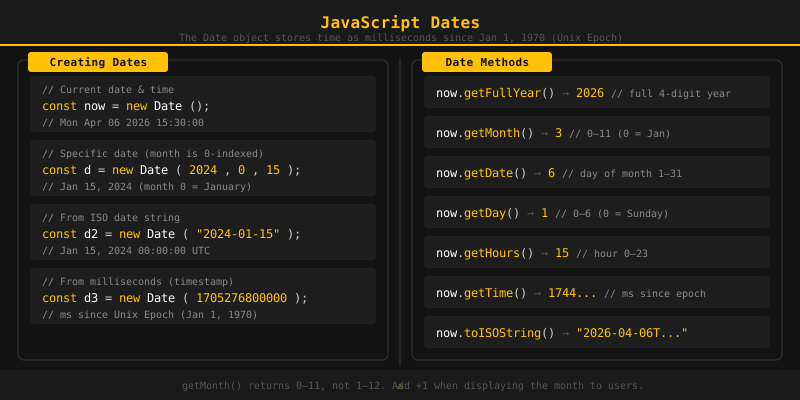
There are four common ways to create a Date object in JavaScript.
1. Current date and time
Calling new Date() with no arguments gives you the current date and time.
const now = new Date();
console.log(now); // e.g. Mon Mar 03 2025 10:30:00 GMT+0000
2. From a date string
You can pass a date string in ISO format or a common format.
const d1 = new Date("2025-01-15");
console.log(d1); // Wed Jan 15 2025

const d2 = new Date("January 15, 2025 10:30:00");
console.log(d2); // Wed Jan 15 2025 10:30:00
3. From individual components
Pass year, month (0-11), day, hours, minutes, seconds, and milliseconds directly. Month starts at 0 (January = 0, December = 11).
// new Date(year, month, day, hours, minutes, seconds, ms)
const d = new Date(2025, 0, 15, 10, 30, 0);
// month 0 = January
console.log(d); // Wed Jan 15 2025 10:30:00
4. From a timestamp (milliseconds)
Pass the number of milliseconds since the Unix epoch.
const d = new Date(0);
console.log(d); // Thu Jan 01 1970 00:00:00 (Unix epoch)

const d2 = new Date(1_000_000_000_000);
console.log(d2); // Sat Sep 09 2001 01:46:40JavaScript stores dates as milliseconds since the Unix epoch. There are 1000 milliseconds in a second. Knowing this helps you convert between time units.
const now = new Date();

// Get timestamp (ms since Unix epoch)
console.log(now.getTime()); // e.g. 1741000000000

// Time unit conversions
const ms = 1000;
const seconds = ms * 60;       // 60,000 ms = 1 minute
const minutes = seconds * 60;  // 3,600,000 ms = 1 hour
const hours = minutes * 24;    // 86,400,000 ms = 1 day

// Calculate days between two dates
const date1 = new Date("2025-01-01");
const date2 = new Date("2025-03-01");
const diffMs = date2 - date1;
const diffDays = diffMs / hours;
console.log(diffDays); // 59
You can also use Date.now() to quickly get the current timestamp without creating a Date object.
console.log(Date.now()); // current timestamp in msGetter methods let you read individual parts of a date such as year, month, day, hour, and so on.
const d = new Date("2025-03-15T10:30:45.500");

console.log(d.getFullYear());     // 2025
console.log(d.getMonth());        // 2  (March, months are 0-indexed)
console.log(d.getDate());         // 15 (day of the month)
console.log(d.getDay());          // 6  (Saturday, 0=Sunday)
console.log(d.getHours());        // 10
console.log(d.getMinutes());      // 30
console.log(d.getSeconds());      // 45
console.log(d.getMilliseconds()); // 500
console.log(d.getTime());         // timestamp in ms
Remember: getMonth() returns 0 for January and 11 for December. Add 1 when displaying it to users.
Setter methods let you change individual parts of an existing date object. This is useful when you want to adjust a date rather than create a new one.
const d = new Date("2025-01-01");

d.setFullYear(2026);
console.log(d.getFullYear()); // 2026

d.setMonth(5); // June (0-indexed)
console.log(d.getMonth()); // 5

d.setDate(20);
console.log(d.getDate()); // 20

d.setHours(9);
d.setMinutes(15);
d.setSeconds(0);
console.log(d); // 2026-06-20 09:15:00
A common use case is adding days to a date:
const today = new Date();
today.setDate(today.getDate() + 7); // add 7 days
console.log(today); // one week from now
The Intl.DateTimeFormat API lets you format dates according to a specific locale (language and region). This is great for displaying dates in a way that feels natural to your users.
const date = new Date("2025-03-15");

// US English
console.log(new Intl.DateTimeFormat("en-US").format(date));
// 3/15/2025

// British English
console.log(new Intl.DateTimeFormat("en-GB").format(date));
// 15/03/2025

// German
console.log(new Intl.DateTimeFormat("de-DE").format(date));
// 15.3.2025
You can also customize the output with options:
const date = new Date("2025-03-15T10:30:00");

const formatter = new Intl.DateTimeFormat("en-US", {
  weekday: "long",
  year: "numeric",
  month: "long",
  day: "numeric",
  hour: "2-digit",
  minute: "2-digit",
});

console.log(formatter.format(date));
// Saturday, March 15, 2025 at 10:30 AM
To get the user's locale from the browser automatically:
const userLocale = navigator.language; // e.g. "en-US"
const date = new Date();
console.log(new Intl.DateTimeFormat(userLocale).format(date));- JavaScript uses a single number type for both integers and decimals.
- All numbers are stored as 64-bit floating point (IEEE 754), which can cause small precision errors with decimals.
- Use
Number(),parseInt(), orparseFloat()to convert values to numbers. - Number systems: binary (
0b), octal (0o), decimal (no prefix), hexadecimal (0x). - Use
Number.isNaN(),Number.isFinite(), andNumber.isInteger()to check number values. - The
Mathobject provides rounding (round,floor,ceil),sqrt,pow,abs, andrandom. - The remainder operator
%returns what is left after division. - Numeric separators (
_) make large numbers easier to read without affecting their value. - BigInt handles integers beyond
Number.MAX_SAFE_INTEGER. Cannot be mixed with regular numbers in arithmetic. - Number methods:
toFixed()for rounding to decimals,toString()for base conversion,valueOf()for the primitive value. - Key Number properties:
MAX_VALUE,MIN_VALUE,POSITIVE_INFINITY,NEGATIVE_INFINITY,NaN. - Use
Intl.NumberFormatto display numbers in locale-specific formats including currency and percentage. - The
Dateobject stores time as milliseconds since the Unix epoch (Jan 1, 1970). - Create dates with
new Date(), a date string, individual components, or a timestamp. - Getter methods like
getFullYear(),getMonth(),getDate()read parts of a date. Note: months are 0-indexed. - Setter methods like
setFullYear(),setMonth(),setDate()change parts of a date. - Use
Intl.DateTimeFormatto format dates according to any locale and with custom options.
What's next? Now that you know how JavaScript works with numbers and dates, let's learn about unique collections in the next tutorial.
Videos for this topic will be added soon.