JavaScript Map
Think of a Map as a super-powered object. It stores key-value pairs just like a regular object, but here's the twist: you can use any type as a key, not just strings. Numbers, booleans, objects, even arrays work as keys.
With a regular object, JavaScript quietly converts all your keys to strings behind the scenes. A Map keeps your keys exactly as they are, which avoids some surprising bugs.
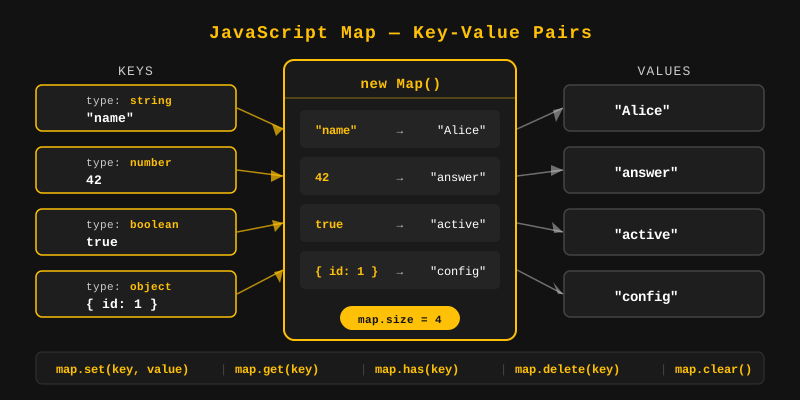
const map = new Map();

map.set("name", "Alice");   // string key
map.set(1, "one");          // number key
map.set(true, "yes");       // boolean key

console.log(map.get("name")); // Alice
console.log(map.get(1));      // one
console.log(map.get(true));   // yes
You create a Map using the new Map() constructor. You can create an empty Map and add entries later, or pass an array of [key, value] pairs directly to the constructor.
// Empty Map
const emptyMap = new Map();

// Map with initial values
const map = new Map([
  ["name", "Alice"],
  ["age", 25],
  ["city", "Paris"]
]);

console.log(map); // Map(3) { 'name' => 'Alice', 'age' => 25, 'city' => 'Paris' }
Use map.set(key, value) to add or update a key-value pair. If the key already exists, the value is updated. If the key is new, a new entry is created.
const map = new Map();

map.set("language", "JavaScript");
map.set("version", 2024);

// Update existing key
map.set("language", "TypeScript");

console.log(map.get("language")); // TypeScript
console.log(map.get("version"));  // 2024
The set() method returns the Map itself, so you can chain multiple set() calls in a single statement. This is a clean way to add several entries at once.
const map = new Map();

map
  .set("name", "Bob")
  .set("age", 30)
  .set("city", "London");

console.log(map.size); // 3Here's a quick look at the methods and properties you'll use with Map:
set(key, value)- Add or update a key-value pair.get(key)- Retrieve the value for a given key.has(key)- Check whether a key exists in the Map.size- Returns the number of entries in the Map.clear()- Remove all entries from the Map.delete(key)- Remove a specific entry by key.keys()- Returns an iterator of all keys.values()- Returns an iterator of all values.entries()- Returns an iterator of all[key, value]pairs.forEach(callback)- Runs a function for each entry in the Map.
Use map.get(key) to retrieve the value associated with a key. If the key does not exist, it returns undefined.
const map = new Map([
  ["fruit", "mango"],
  ["color", "yellow"]
]);

console.log(map.get("fruit"));   // mango
console.log(map.get("color"));   // yellow
console.log(map.get("taste"));   // undefined (key not found)
Use map.has(key) to check whether a key exists in the Map. It returns true if the key is present, and false if not.
const map = new Map([["name", "Alice"]]);

console.log(map.has("name"));  // true
console.log(map.has("email")); // false
The size property returns the number of key-value pairs stored in the Map. Unlike arrays, you do not use .length - Maps use .size.
const map = new Map();
map.set("a", 1);
map.set("b", 2);
map.set("c", 3);

console.log(map.size); // 3
The clear() method removes all key-value pairs from the Map, leaving it empty. The Map still exists after calling clear() - it just has no entries.
const map = new Map([["x", 10], ["y", 20]]);
console.log(map.size); // 2

map.clear();
console.log(map.size); // 0
Use map.delete(key) to remove a specific entry. It returns true if the key was found and removed, or false if the key did not exist.
const map = new Map([["name", "Alice"], ["age", 25]]);

map.delete("age");

console.log(map.has("age")); // false
console.log(map.size); // 1Since a Map accepts any value as a key, you can even use an array or object. But here's the catch: Map matches keys by identity, not by content. Think of it like house keys. Two that look identical still won't open the same door unless they're the exact same key.
const coords = [10, 20];
const map = new Map();

map.set(coords, "location A");

console.log(map.get(coords));   // location A
console.log(map.get([10, 20])); // undefined (different array reference)
Two separate arrays with the same contents are not the same reference, so map.get([10, 20]) returns undefined even though the values look identical.
You can iterate over a Map using a for...of loop with map.entries(), map.keys(), or map.values(). Map entries are iterated in insertion order.
const map = new Map([["a", 1], ["b", 2], ["c", 3]]);

// Iterate over entries (key-value pairs)
for (const [key, value] of map.entries()) {
  console.log(key, value); // a 1, b 2, c 3
}

// Iterate over keys only
for (const key of map.keys()) {
  console.log(key); // a, b, c
}

// Iterate over values only
for (const value of map.values()) {
  console.log(value); // 1, 2, 3
}
You can convert a plain object to a Map using Object.entries(obj), which returns an array of [key, value] pairs that you can pass directly to new Map().
const person = { name: "Alice", age: 25, city: "Paris" };

const map = new Map(Object.entries(person));

console.log(map.get("name")); // Alice
console.log(map.size);        // 3
You can convert a Map to an array using the spread operator [...map] or Array.from(map). Both produce an array of [key, value] pairs.
const map = new Map([["a", 1], ["b", 2]]);

// Using spread operator
const arr1 = [...map];
console.log(arr1); // [['a', 1], ['b', 2]]

// Using Array.from
const arr2 = Array.from(map);
console.log(arr2); // [['a', 1], ['b', 2]]

// Keys or values only as arrays
const keys = [...map.keys()];     // ['a', 'b']
const values = [...map.values()]; // [1, 2]
The forEach method iterates over each entry in the Map and calls a callback function with (value, key, map) as arguments. Note that value comes before key - the opposite of what you might expect.
const map = new Map([["name", "Alice"], ["age", 25]]);

map.forEach((value, key) => {
  console.log(`${key}: ${value}`);
});
// name: Alice
// age: 25A WeakMap is like a Map with a looser grip. It only allows objects as keys (no strings or numbers), and it holds those keys weakly. If nothing else in your code references the key object, JavaScript can automatically clean it up from memory.
Because of this loose grip, you can't loop over a WeakMap or check its size. Methods like keys(), values(), and clear() aren't available either. WeakMap is handy when you want to attach extra data to an object without stopping JavaScript from cleaning that object up later.
const weakMap = new WeakMap();

let user = { name: "Alice" };
weakMap.set(user, "admin");

console.log(weakMap.get(user)); // admin
console.log(weakMap.has(user)); // true

// When 'user' is set to null, the entry can be garbage collected
user = null;- Map - stores key-value pairs where keys can be of any type.
- new Map() - creates a new Map, optionally initialized with
[key, value]pairs. - set(key, value) - adds or updates an entry; returns the Map (chainable).
- get(key) - retrieves the value for a key; returns
undefinedif not found. - has(key) - returns
trueif the key exists, otherwisefalse. - size - returns the number of entries in the Map.
- clear() - removes all entries from the Map.
- delete(key) - removes a specific entry by key.
- Iteration - use
for...ofwithentries(),keys(), orvalues(). - Object to Map - use
new Map(Object.entries(obj)). - Map to Array - use
[...map]orArray.from(map). - forEach - callback receives
(value, key)- value comes first. - WeakMap - like Map but keys must be objects and are weakly held (garbage collectible).
What's next? Now that you know how Maps organize key-value data, let's make assignments cleaner with destructuring in the next tutorial.
Videos for this topic will be added soon.