JavaScript DOM
The DOM (Document Object Model) is how your browser sees an HTML page. Think of it like a family tree: every element, attribute, and piece of text is a "node" connected to other nodes.
When your browser loads a page, it builds this tree from the HTML. You can then use JavaScript to read and change the tree, updating what's on screen without reloading the page.
<!-- HTML structure -->
<html>
  <body>
    <h1 id="title">Hello World</h1>
    <p>Welcome to the DOM.</p>
  </body>
</html>
Your browser turns the HTML above into a tree of nodes. You can use JavaScript to walk this tree, find elements, and change them whenever you want.
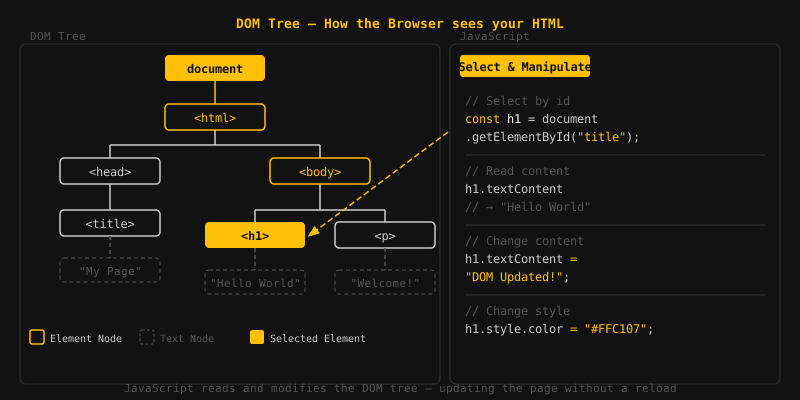
Before you can change an element, you need to select it. JavaScript gives you several methods to find elements in the DOM.
Use getElementById() to grab a single
element by its id. You get the element
back, or null if nothing matches.
// HTML: <h1 id="title">Hello</h1>

const heading = document.getElementById("title");
console.log(heading.textContent); // Output: Hello
Since every id on a page must be unique,
you'll always get back one element or nothing.
With querySelector(), you pass in any CSS
selector and get back the first matching
element. It's more flexible than
getElementById.
// HTML: <p class="intro">Welcome</p>

const para = document.querySelector(".intro");
console.log(para.textContent); // Output: Welcome

// Select by tag name
const firstBtn = document.querySelector("button");

// Select by attribute
const link = document.querySelector('a[href="#top"]');
Need all matching elements, not just the
first? Use querySelectorAll(). It gives
you a NodeList you can loop over with
forEach.
// HTML: <li>Apple</li> <li>Banana</li> <li>Cherry</li>

const items = document.querySelectorAll("li");

items.forEach(item => {
  console.log(item.textContent);
});
// Output: Apple, Banana, CherryOnce you have a reference to an element, you can read and change its properties.
Use innerHTML to read or replace the HTML
inside an element, tags and all.
const box = document.getElementById("box");

// Read HTML content
console.log(box.innerHTML); // e.g. "<strong>Hello</strong>"

// Set HTML content (renders as HTML)
box.innerHTML = "<strong>Updated!</strong>";
Be careful with innerHTML when inserting
user-provided data, as it can expose your page to
cross-site scripting (XSS) attacks. Use
textContent instead when you only need
plain text.
textContent lets you read or set the
plain text inside an element. Unlike
innerHTML, it treats everything as text,
so any HTML tags you pass in won't be rendered.
const msg = document.getElementById("msg");

// Read text (no HTML tags)
console.log(msg.textContent); // Output: Hello World

// Set plain text (tags are escaped, not rendered)
msg.textContent = "Goodbye <World>";
You can read, set, and remove HTML attributes using
getAttribute, setAttribute, and
removeAttribute.
// HTML: <img id="logo" src="old.png" alt="Logo">

const img = document.getElementById("logo");

// Read an attribute
console.log(img.getAttribute("src")); // Output: old.png

// Change an attribute
img.setAttribute("src", "new.png");

// Remove an attribute
img.removeAttribute("alt");
The style property lets you apply inline CSS
to an element. CSS property names use camelCase in
JavaScript (e.g. backgroundColor instead of
background-color).
const box = document.getElementById("box");

box.style.backgroundColor = "blue";
box.style.color = "white";
box.style.fontSize = "20px";
For toggling visual states, prefer adding and removing CSS
classes with classList.add(),
classList.remove(), or
classList.toggle().
const btn = document.getElementById("btn");

btn.classList.add("active");      // add a class
btn.classList.remove("hidden");   // remove a class
btn.classList.toggle("open");     // add if absent, remove if present
You can create, add, and remove elements on the page
with JavaScript. The three methods you'll use most are
createElement,
appendChild, and removeChild.
document.createElement() builds a new
HTML element in memory. It won't show up on the page
until you attach it to the DOM.
// Create a new paragraph element
const newPara = document.createElement("p");
newPara.textContent = "I was created with JavaScript!";
Call appendChild() on a parent to add an
element as its last child. If that element already
exists somewhere in the DOM, it gets moved here.
// HTML: <ul id="list"></ul>

const list = document.getElementById("list");

const item = document.createElement("li");
item.textContent = "New item";

list.appendChild(item);
// Result: <ul><li>New item</li></ul>
To delete an element, call removeChild()
on its parent and pass in the element you want gone.
// HTML: <ul id="list"><li id="item1">First</li></ul>

const list = document.getElementById("list");
const item = document.getElementById("item1");

list.removeChild(item); // removes the li from the ul

// Modern shorthand (no need for parent reference)
item.remove();- The DOM is a tree of objects that represents an HTML page.
- getElementById selects one element by its unique id.
- querySelector selects the first element matching a CSS selector.
- querySelectorAll returns all matching elements as a NodeList.
- innerHTML reads or writes HTML content inside an element.
- textContent reads or writes plain text, safely escaping HTML.
- setAttribute / getAttribute manage HTML attributes.
- style and classList control element styling.
- createElement + appendChild add new elements to the page.
- removeChild / remove() delete elements from the page.