JavaScript Arrays
Think of an array as a container that holds multiple values in one place. Instead of creating a separate variable for each value, you group them all together in a single array.
You can put any type of data inside an array: numbers, strings, booleans, objects, and even other arrays. Each item sits at a fixed position, so the order is always preserved.
let fruits = ["apple", "banana", "cherry"];

console.log(fruits); // ["apple", "banana", "cherry"]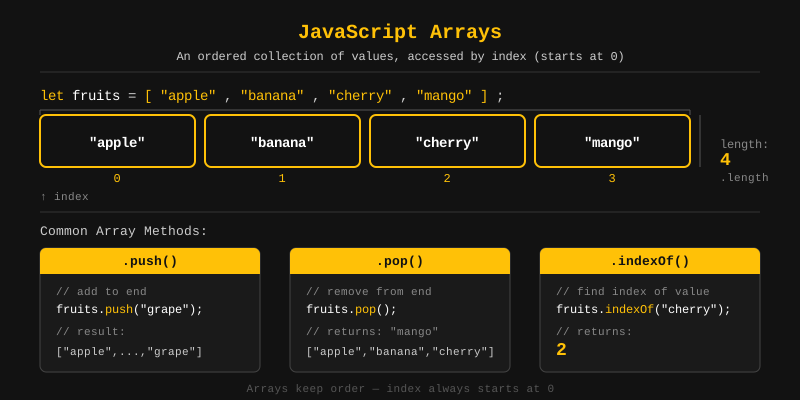
Without arrays, you would need a separate variable for every value. That quickly becomes hard to manage, especially when you do not know how many values you will have ahead of time.
Arrays let you store, loop through, and manage a collection of values using a single variable name. This makes your code shorter, cleaner, and easier to maintain.
// Without arrays - messy
let fruit1 = "apple";
let fruit2 = "banana";
let fruit3 = "cherry";

// With arrays - clean
let fruits = ["apple", "banana", "cherry"];You can create an array in two ways: using an array literal (the most common) or the Array constructor.
We recommend the array literal syntax because it's simpler and easier to read. The new Array() constructor works too, but you'll rarely see it in practice.
// Array Literal (recommended)
let colors = ["red", "green", "blue"];

// Array Object using new Array()
let numbers = new Array(1, 2, 3, 4, 5);

console.log(colors);  // ["red", "green", "blue"]
console.log(numbers); // [1, 2, 3, 4, 5]
Watch out: new Array(3) creates an empty array with 3 slots, not an array containing the number 3. Stick with the literal syntax to avoid this gotcha.
Every item in an array has a numbered position called an index. Indexes start at 0, so the first item is at index 0, the second at index 1, and so on.
You can read or update any item by using its index with square brackets.
let fruits = ["apple", "banana", "cherry"];

console.log(fruits[0]); // apple
console.log(fruits[1]); // banana
console.log(fruits[2]); // cherry

// Update an element
fruits[1] = "mango";
console.log(fruits); // ["apple", "mango", "cherry"]
The length property tells you how many items are in your array. It's always one more than the highest index.
A handy trick: you can grab the last item with length - 1, since that's always the last index.
let fruits = ["apple", "banana", "cherry"];

console.log(fruits.length); // 3

// Access the last element
console.log(fruits[fruits.length - 1]); // cherry
You can declare arrays with let, const, or var. Most developers use const because it stops you from accidentally reassigning the variable, while still letting you change the array's contents.
// Using const (recommended)
const scores = [10, 20, 30];
scores.push(40); // OK - modifying contents is allowed
// scores = [1, 2]; // Error - reassigning is not allowed

// Using let
let names = ["Alice", "Bob"];
names = ["Charlie"]; // OK - reassigning is allowed with let

// Empty array
const empty = [];
Looping lets you go through each item in an array one by one. The two most common ways are the for loop and the forEach method.
const fruits = ["apple", "banana", "cherry"];

// Using a for loop
for (let i = 0; i < fruits.length; i++) {
  console.log(fruits[i]);
}
// apple
// banana
// cherry

// Using forEach
fruits.forEach(function(fruit) {
  console.log(fruit);
});
// apple
// banana
// cherry
Use the for loop when you need the index (the position number). Use forEach when you just want to do something with each item, since it's cleaner.
JavaScript gives you a bunch of built-in methods on arrays so you don't have to reinvent the wheel. You can add, remove, search, transform, and combine arrays with just a single method call.
Here's a quick overview of the ones you'll use most:
- push(): add to end
- pop(): remove from end
- unshift(): add to beginning
- shift(): remove from beginning
- toString(): convert to string
- join(): join elements with a separator
- concat(): merge arrays
- splice(): add or remove at a position
- slice(): extract a portion
- sort(): sort elements
- reverse(): reverse the order
- forEach(): loop through elements
- at(): access element by index (supports negative index)
- map(): transform each element
- filter(): keep elements that match a condition
- reduce(): combine all elements into one value
- find(): find first matching element
- findIndex(): find index of first match
- some(): check if any element matches
- every(): check if all elements match
- flat(): flatten nested arrays
- flatMap(): map then flatten
Use push() to add one or more items to the end of an array. It returns the new length.
push("cherry")

 Before:                      After:
 +----------------+           +-------------------------+
 | apple | banana |           | apple | banana | cherry |
 +----------------+           +-------------------------+
  length = 2                   length = 3
                                              ?
                                         added at end
const fruits = ["apple", "banana"];

fruits.push("cherry");
console.log(fruits); // ["apple", "banana", "cherry"]

// Push multiple items
fruits.push("mango", "grape");
console.log(fruits); // ["apple", "banana", "cherry", "mango", "grape"]
Use pop() to remove the last item from an array. It gives you back the removed item and changes the original array.
pop()

 Before:                       After:
 +-------------------------+   +----------------+
 | apple | banana | cherry |   | apple | banana |
 +-------------------------+   +----------------+
  length = 3                    length = 2

 Returns: "cherry"
const fruits = ["apple", "banana", "cherry"];

const removed = fruits.pop();
console.log(removed); // cherry
console.log(fruits);  // ["apple", "banana"]
Use unshift() to add one or more items to the beginning of an array. It returns the new length.
unshift("apple")

 Before:                       After:
 +-----------------+           +-------------------------+
 | banana | cherry |           | apple | banana | cherry |
 +-----------------+           +-------------------------+
  length = 2                    length = 3
                                ?
                           added at start
const fruits = ["banana", "cherry"];

fruits.unshift("apple");
console.log(fruits); // ["apple", "banana", "cherry"]
Use shift() to remove the first item from an array. It returns the removed item, and everything else shifts down one position.
shift()

 Before:                       After:
 +-------------------------+   +-----------------+
 | apple | banana | cherry |   | banana | cherry |
 +-------------------------+   +-----------------+
  length = 3                    length = 2

 Returns: "apple"
const fruits = ["apple", "banana", "cherry"];

const first = fruits.shift();
console.log(first);  // apple
console.log(fruits); // ["banana", "cherry"]
Call toString() to turn an array into a comma-separated string. Your original array stays unchanged.
toString()

 +-------------------------+
 | apple | banana | cherry |
 +-------------------------+
            |
            ?
 "apple,banana,cherry"
const fruits = ["apple", "banana", "cherry"];

console.log(fruits.toString()); // "apple,banana,cherry"
Use join() to combine all items of an array into a single string. You can pass any separator you like. If you don't pass one, it defaults to a comma.
join(" - ")

 +-------------------------+
 | apple | banana | cherry |
 +-------------------------+
            |
            ?
 "apple - banana - cherry"
const fruits = ["apple", "banana", "cherry"];

console.log(fruits.join());      // "apple,banana,cherry"
console.log(fruits.join(" - ")); // "apple - banana - cherry"
console.log(fruits.join(""));    // "applebananacherry"
Use concat() to merge two or more arrays into a brand-new array. Your original arrays stay untouched.
concat()

 Array a:        Array b:       Array c:
 +-------+      +-------+      +-------+
 | 1 | 2 |  +   | 3 | 4 |  +   | 5 | 6 |
 +-------+      +-------+      +-------+
                    |
                    ?
          +-----------------------+
 result:  | 1 | 2 | 3 | 4 | 5 | 6 |
          +-----------------------+
const a = [1, 2];
const b = [3, 4];
const c = [5, 6];

const result = a.concat(b, c);
console.log(result); // [1, 2, 3, 4, 5, 6]
Use splice() to add, remove, or replace items at any position in an array. It changes the original array and returns whatever was removed.
Syntax: splice(startIndex, deleteCount, item1, item2, ...)
splice(1, 1) | Remove 1 element at index 1

 Before:
 +---------------------------------+
 | apple | banana | cherry | mango |
 +---------------------------------+
    0        1        2        3
             ?
          removed

 After:
 +------------------------+
 | apple | cherry | mango |
 +------------------------+

 Removed: ["banana"]
const fruits = ["apple", "banana", "cherry", "mango"];

// Remove 1 element at index 1
const removed = fruits.splice(1, 1);
console.log(removed); // ["banana"]
console.log(fruits);  // ["apple", "cherry", "mango"]

// Insert at index 1 without removing
fruits.splice(1, 0, "grape");
console.log(fruits);  // ["apple", "grape", "cherry", "mango"]
Use slice() to copy a portion of an array between a start and end index. It returns a new array and leaves the original unchanged.
The end index is not included in the result. If you skip the end, it copies everything from the start to the end of the array.
slice(1, 3)

 +-----------------------------------------+
 | apple | banana | cherry | mango | grape |
 +-----------------------------------------+
    0        1        2        3       4
             ?                 ?
           start              end
             +----------------+
                      ?
            +-----------------+
  result:   | banana | cherry |
            +-----------------+
const fruits = ["apple", "banana", "cherry", "mango", "grape"];

console.log(fruits.slice(1, 3)); // ["banana", "cherry"]
console.log(fruits.slice(2));    // ["cherry", "mango", "grape"]
console.log(fruits);             // original is unchanged
Use sort() to sort an array in place. By default, it sorts items as strings in A-Z order.
Here's a common gotcha: without a comparison function, numbers get sorted as strings too (so 10 comes before 2!). Always pass a compare function when sorting numbers.
sort()

 Before:
 +-------------------------+
 | cherry | apple | banana |
 +-------------------------+

 After:
 +-------------------------+
 | apple | banana | cherry |
 +-------------------------+
  A ? B ? C (alphabetical)
// Sorting strings
const fruits = ["cherry", "apple", "banana"];
fruits.sort();
console.log(fruits); // ["apple", "banana", "cherry"]

// Sorting numbers
const nums = [10, 2, 30, 5];
nums.sort((a, b) => a - b); // ascending
console.log(nums); // [2, 5, 10, 30]
Use reverse() to flip an array in place. The first item becomes the last, and the last becomes the first.
reverse()

 Before:
 +-------------------+
 | 1 | 2 | 3 | 4 | 5 |
 +-------------------+

 After:
 +-------------------+
 | 5 | 4 | 3 | 2 | 1 |
 +-------------------+
const nums = [1, 2, 3, 4, 5];

nums.reverse();
console.log(nums); // [5, 4, 3, 2, 1]
Use forEach() to run a function on every item in an array. Unlike a regular loop, you can't break out of it early, and it doesn't return a new array.
forEach(callback)

 +-----------+
 | 1 | 2 | 3 |
 +-----------+
   |   |   |
   ?   ?   ?
 fn(1) fn(2) fn(3)

 No new array returned
const nums = [1, 2, 3];

nums.forEach((num, index) => {
  console.log(index + ": " + num);
});
// 0: 1
// 1: 2
// 2: 3
Use at() to grab an item by its index. The cool part? It supports negative indexes, so -1 gives you the last item, -2 the second to last, and so on.
at(index)

 +-------------------------+
 | apple | banana | cherry |
 +-------------------------+
    0        1        2
   -3       -2       -1

 at(0)  ? "apple"
 at(-1) ? "cherry"
const fruits = ["apple", "banana", "cherry"];

console.log(fruits.at(0));  // apple
console.log(fruits.at(-1)); // cherry (last element)
console.log(fruits.at(-2)); // banana
Use map() to transform every item in an array and get back a new array with the results. Your original array stays unchanged.
map(n => n * 2)

 Original:
 +---------------+
 | 1 | 2 | 3 | 4 |
 +---------------+
   |   |   |   |
  |2  |2  |2  |2
   |   |   |   |
   ?   ?   ?   ?
 +---------------+
 | 2 | 4 | 6 | 8 |   ? new array
 +---------------+
const nums = [1, 2, 3, 4];

const doubled = nums.map(n => n * 2);
console.log(doubled); // [2, 4, 6, 8]
console.log(nums);    // [1, 2, 3, 4] - original unchanged
Use filter() to keep only the items that pass a condition (where your callback returns true). You get back a new array, and the original stays the same.
filter(n => n % 2 === 0)

 +-----------------------+
 | 1 | 2 | 3 | 4 | 5 | 6 |
 +-----------------------+
       |       |       |
     even?   even?   even?
     ? yes   ? yes   ? yes
       |       |       |
       ?       ?       ?
     +-----------+
     | 2 | 4 | 6 |  ? new array
     +-----------+
const nums = [1, 2, 3, 4, 5, 6];

const evens = nums.filter(n => n % 2 === 0);
console.log(evens); // [2, 4, 6]
Think of reduce() like a snowball rolling downhill, picking up everything in its path. It processes each item and combines them all into a single value.
Your callback gets two arguments: the accumulator (the running total so far) and the current value being processed.
reduce((acc, curr) => acc + curr, 0)

 +-------------------+
 | 1 | 2 | 3 | 4 | 5 |
 +-------------------+

 Step 1: 0 + 1 = 1
 Step 2: 1 + 2 = 3
 Step 3: 3 + 3 = 6
 Step 4: 6 + 4 = 10
 Step 5: 10 + 5 = 15  ? final value
const nums = [1, 2, 3, 4, 5];

const sum = nums.reduce((acc, curr) => acc + curr, 0);
console.log(sum); // 15
Use find() to get the first item that matches a condition. If nothing matches, you get back undefined.
find(n => n > 10)

 +---------------------+
 | 3 | 7 | 12 | 5 | 20 |
 +---------------------+
            |
     first match (> 10)
            |
            ?
           12
const nums = [3, 7, 12, 5, 20];

const firstBig = nums.find(n => n > 10);
console.log(firstBig); // 12
Use findIndex() to get the position of the first item that matches a condition. If nothing matches, it returns -1.
findIndex(n => n > 10)

 +---------------------+
 | 3 | 7 | 12 | 5 | 20 |
 +---------------------+
   0   1    2    3    4
            ?
      first match index
            |
            ?
            2
const nums = [3, 7, 12, 5, 20];

const index = nums.findIndex(n => n > 10);
console.log(index); // 2
Use some() to check if at least one item in your array passes a condition. It returns true or false.
some(n => n % 2 === 0)

 +---------------+
 | 1 | 3 | 5 | 8 |
 +---------------+
               |
           8 is even ?
               |
               ?
             true
const nums = [1, 3, 5, 8];

console.log(nums.some(n => n % 2 === 0)); // true  (8 is even)
console.log(nums.some(n => n > 100));     // false
Use every() to check if all items in your array pass a condition. You get true only if every single item passes, otherwise false.
every(n => n % 2 === 0)

 +---------------+
 | 2 | 4 | 6 | 8 |
 +---------------+
   |   |   |   |
   ?   ?   ?   ?  all even
               |
               ?
             true
const nums = [2, 4, 6, 8];

console.log(nums.every(n => n % 2 === 0)); // true  (all are even)
console.log(nums.every(n => n > 5));       // false (2 and 4 are not)
Use flat() to squish nested arrays into a single flat array. You can specify how many levels deep to flatten (the default is 1).
flat()

 Before (nested):
 +----------------------------+
 | 1 | [2, 3]  | [4, [5, 6]]  |
 +----------------------------+

 After flat(1):
 +------------------------+
 | 1 | 2 | 3 | 4 | [5, 6] |
 +------------------------+

 After flat(2):
 +-----------------------+
 | 1 | 2 | 3 | 4 | 5 | 6 |
 +-----------------------+
const nested = [1, [2, 3], [4, [5, 6]]];

console.log(nested.flat());    // [1, 2, 3, 4, [5, 6]]
console.log(nested.flat(2));   // [1, 2, 3, 4, 5, 6]
console.log(nested.flat(Infinity)); // [1, 2, 3, 4, 5, 6]
Use flatMap() to transform each item and then flatten the result by one level. It's basically map() + flat(1) combined into a single step.
flatMap(s => s.split(" "))

 +---------------------------+
 | "hello world" | "foo bar" |
 +---------------------------+
         |             |
    split(" ")    split(" ")
     |    |        |    |
     ?    ?        ?    ?
 +---------------------------+
 | hello | world | foo | bar |
 +---------------------------+
const sentences = ["hello world", "foo bar"];

const words = sentences.flatMap(s => s.split(" "));
console.log(words); // ["hello", "world", "foo", "bar"]Let's wrap up! Here's a quick recap of everything we covered:
- An array stores multiple values in a single variable.
- Array indexes start at 0.
- Use
constto declare arrays when the reference should not change. push/popadd or remove from the end.unshift/shiftadd or remove from the beginning.splicemodifies the array in place;slicereturns a copy.map,filter, andreduceare the most powerful tools for transforming data.findandfindIndexsearch for elements by condition.someandeverycheck conditions across the array.flatandflatMaphandle nested arrays.
What's next? Now that you can work with lists of values, let's learn how JavaScript stores data as key-value pairs in the next tutorial.
Videos for this topic will be added soon.